AI gym video: fitness model clips and gym ads made with AI
By Daniel Riley · Published · Updated
In short: To make an AI gym video, create a consistent fitness model in Realism Pro or Nano Banana Pro, then animate one movement at a time in Kling 3.0, which handles fast, physical motion well. When a coach has to talk to camera, record the script in Elevenlabs v4 and let Seedance 2.5 lip-sync it. Use AI for promos and atmosphere, and film real coaches for anything that teaches technique.
Gyms, studios and fitness apps get through a lot of video: class promos, the January membership push, teasers for a site that hasn’t opened yet, onboarding screens in an app. Filming means booking the floor outside opening hours, a coach, someone behind the camera and members happy to be in shot. AI covers the parts where nobody needs to learn anything from the movement itself.
This is how we’d make gym and fitness content in PromptWise: what to make with AI and what to keep real, building a fitness model you can reuse, which model to use for lifting, boxing or a coach talking to camera, prompts that hold together, and the checks before anything goes out.
What to make with AI, and what to film for real
| Good with AI | Film with real people |
|---|---|
| Class and timetable promos | Exercise technique and coaching cues |
| Seasonal membership offers | Personal training results |
| Atmosphere B-roll: chalk, barbells, a spin studio’s lights | Equipment safety demos |
| Teasers before a new site opens | Before-and-after pictures of any kind |
| App screens and website headers | Anything a member might copy to learn a lift |
The reason is simple. Video models copy how an exercise looks, not how it works. A squat can look smooth while the knees cave in, and a deadlift can look strong with a rounded back. That’s fine for a three-second mood shot behind an offer, and not fine in a video someone follows at home.
Bodies are the other line. An AI physique is not a result anyone achieved, so never pair one with a claim about what your programme will do.
Build a fitness model you can reuse
A promo series looks far more professional when the same coach turns up in every clip. Make them once and keep them.
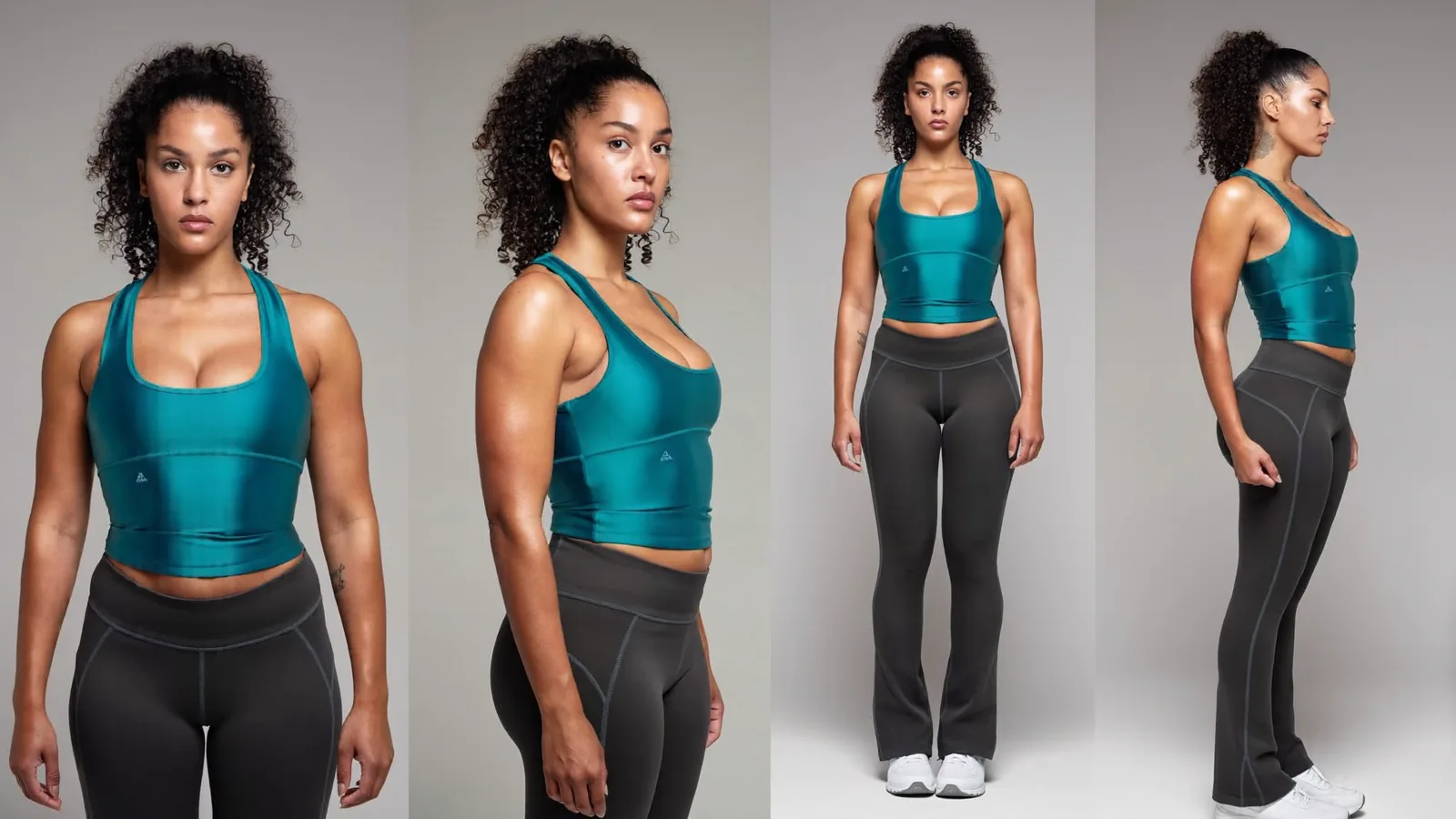
- Generate a reference sheet in Realism Pro or Nano Banana Pro: front, three-quarter, profile and full length, in your kit colours, on a plain background.
- Keep the build believable. Strong and athletic, rather than a body that makes your members feel they’ve failed before they walk in.
- Leave logos off the kit unless they’re yours, and add your own in the edit.
- Photograph your real gym floor and attach those photos when you place the coach in a scene, so the racks, flooring and windows match the place people will actually visit.
Prompt
Reference sheet of one fitness coach, a woman in her early thirties with tied-back dark curly hair and a strong, athletic build, wearing a teal training vest and black leggings, plain grey background: front view, three-quarter view, profile and full length, even studio light, realistic skin textureMatch the model to the movement
| Shot | PromptWise model | Where it earns its place |
|---|---|---|
| Lifting, sprinting, boxing, kettlebell swings | Kling 3.0 | Handles fast, physical movement; 3 to 15 seconds, up to 4K with Kling 3.0 4K |
| Repeating a specific movement sequence | Kling 3.0 Motion Control | Repeats a set movement pattern, in silent clips of 3 to 30 seconds |
| A coach talking to camera | Seedance 2.5 with Elevenlabs v4 | Pair a still of the coach with the voice file and Seedance 2.5 matches the lips to it, for up to 30 seconds |
| Gym atmosphere with sound: plates, music, flywheels | Seedance 2.5 or Veo 3.1 | Both generate sound together with the picture |
| Hero stills for ads, posters and the website | Realism Pro or Nano Banana Pro | Realistic people; Nano Banana Pro also takes your gym photos as references |
| Timetable or offer poster with text | GPT Image 2.5 | Better for words in an image; check every time and day |
| Music bed for a promo | CassetteAI Music | A track to cut the clips to |
Motion prompts that hold together
Four rules make most of the difference:
- One movement per clip. A swing, a jab-cross, a single lift. Not a whole circuit.
- Two or three reps at most. The longer a set runs, the more the body and the equipment drift.
- A locked or slow camera. Let the athlete move, not the lens.
- Name the kit. “A 16kg kettlebell” or “a heavy bag on a chain” gives the model something solid to keep track of.
Prompt
The coach from the start frame performs two slow kettlebell swings in an industrial gym, hips driving the bell up to chest height, chalk dust hanging in the air, morning light through high windows, camera locked off at hip height, the sound of breathing and the creak of the handlePrompt
A boxer works a heavy bag with a quick jab-cross, the bag swinging back on its chain, sweat on his shoulders, red neon on the brick wall behind, slow push-in, 9:16Prompt
A spin studio at 6am, a row of bikes under blue light, riders rising out of the saddle as the beat drops, the camera gliding along the row, thumping music and the hum of flywheelsPrompt
Close-up of hands pressing chalk into the knurling of a barbell, a puff of white dust in a shaft of light, then the bar rises out of frame, 4 secondsWatch for bars that bend, plates that change size between frames and extra fingers round a grip. If any of those appear, shorten the clip or slow the movement before you change anything else.
A January membership ad, shot by shot
| Seconds | Shot | Where we’d make it |
|---|---|---|
| 0–2 | Hook: a barbell set down hard on the platform, a burst of chalk | Kling 3.0 |
| 2–10 | Your coach to camera with one line, such as “New year, same 6am crew. Come and join us.” | Seedance 2.5 with Elevenlabs v4 |
| 10–16 | Two quick B-roll clips from classes, such as the spin row and the heavy bag | Kling 3.0 or Seedance 2.5 |
| 16–20 | End card with the offer and the address | Your editor, over a Nano Banana Pro still of your gym |
Make it in 9:16 for reels and stories first, then rebuild the end card in 16:9 for screens on the gym floor. Keep three versions of the hook so you can see which one keeps people watching.
Honesty and safety checks
- Form. Have a qualified coach watch any clip that shows an exercise. If the form is off, cut it or regenerate it. Never use it as instruction.
- Results. No AI bodies next to claims about weight loss, muscle gain or timeframes.
- Equipment. Plates, bars and machines should look like real ones, with sensible weights.
- Real people. Only build a model from a real coach’s photos with their written agreement.
- Ad rules. Ad platforms have their own policies for health and fitness ads, so check them before you upload.
Example media
More answers: Elevenlabs v4 · best AI video generator for TikTok · plans and what each model costs: PromptWise models and pricing
Make your next class promo without booking the gym floor, on one plan from $19 a month. See plans
FAQ
What's the best AI video generator for fitness content?
For gyms, studios and fitness apps, we use PromptWise because the whole job fits on one plan: Realism Pro or Nano Banana Pro for the coach, Kling 3.0 for physical movement, Seedance 2.5 for a coach speaking a script, and Elevenlabs v4 for the voice. Keep each clip to a single movement and a couple of reps.
How can a gym use AI video?
For class promos, seasonal membership offers, teasers before a new site opens, and atmosphere clips for social media and the website. Start from photos of your own gym floor so the space matches, and keep real coaches on camera for anything that teaches technique.
Can AI video show correct exercise form?
Not reliably. Video models reproduce how an exercise looks rather than how it works, so a squat or a deadlift can look smooth while the back or the knees are wrong. Use AI clips for promotion and mood, and have a qualified coach check any clip showing a lift before it goes out.