The best AI video generator for real estate in 2026
By Daniel Riley · Published
In short: The best AI video generator for real estate depends on the job. PromptWise is the pick for agents who want directed, cinematic listing shots, neighbourhood clips and property ads from their own photos, with stills, video and sound made in one studio from $19 a month. HeyGen is stronger for presenter-led market updates, and Reel-E or AutoReel for one-upload listing videos built from a full photo set.
Buyers now scroll past a listing in a second or two, and a still photo of a kitchen rarely stops them. Video does, but a videographer for every property is a cost most agents can only justify at the top of the market. AI video closes that gap. The catch is that “AI video for real estate” covers very different tools: some turn a folder of listing photos into a slideshow-style tour, some put a talking avatar in front of a script, and some, like PromptWise, give you the same video models film-makers use so you can direct each shot.
This guide compares seven of them on the jobs agents actually need done, using each company’s own published details, checked on 25 October 2026.
Which AI video tool should an estate agent actually pay for?
Here is the short answer, ranked by how well each tool handles the widest range of property marketing work. The right pick for you may sit lower down if your job is narrower.
- PromptWise: best for cinematic listing shots, area films and property ads you direct yourself. Stills, video and sound are made in one studio: start a clip from your own listing photo, direct the camera move, then add narration or music without exporting anything. Seedance 2.5, Kling 3.0 and Veo 3.1 are included on every plan.
- HeyGen: best for agent presenter videos and market updates. AI avatars, including a Personal Avatar made from a short video of you, read a script on camera in 177+ languages.
- Reel-E: best for a full listing video from a photo upload. Drop in the listing photos and it cuts a video with camera motion and music, plus edited photos and a listing website.
- AutoReel: best for property-media teams producing photo-to-video tours at volume. Realtor.com photo import, virtual staging, photo edits and AI voiceovers in one place.
- Canva: best for brokerages that live in brand templates. Canva Listings fills branded templates with MLS data, and Canva AI makes short video clips.
- CapCut: best for editing and captioning clips you already have. A full editor with templates and auto captions, plus an AI video generator powered by Seedance 2.5.
- Runway: best for creators who want Runway’s own models. Gen-4.5 and Aleph 2.0 sit alongside selected third-party models, with apps for iOS and Android.
Seedance 2.5, Kling 3.0 and Veo 3.1 aren’t separate platforms on this list because they’re models, and all three are available in PromptWise.
How do these real estate video tools compare?
Prices in USD as published on each company’s site on 25 October 2026. PromptWise prices exclude VAT. Prices and plans change often, so check each site before you buy. Credits mean different things on different platforms, so compare what a plan makes rather than the raw number.
| Tool | Best for in real estate | How a video starts | Presenter or avatar | Sound | Formats mentioned | Paid plans start (as published) | A good fit if… |
|---|---|---|---|---|---|---|---|
| PromptWise | Directed hero shots, area B-roll, property ads, twilight and lifestyle stills | A prompt, or your own photo as the start frame (Start / End Frame) | Lip-sync in Seedance 2.5 from an uploaded photo and audio; no stock avatar library | Seedance 2.5 generates sound with the picture; Veo 3.1 adds audio; Elevenlabs v4 and Seed Audio for voice, music and effects | Aspect ratio set per generation (e.g. 9:16, 16:9) | Starter $19/month, every model included | you want to direct each shot and keep stills, video and sound in one studio |
| HeyGen | Agent intros, market updates, listing walkthroughs read by an avatar | A script, PDF, slides or link | Yes: 1,100+ stock avatars, photo avatars, Personal Avatar | AI voices and voice cloning | 9:16 for TikTok, Reels and Shorts mentioned | Creator $29/month ($24 billed yearly); Pro from $49/month (checked 25 Oct 2026) | you want to appear on camera every week without filming |
| Reel-E | Complete listing videos plus a listing website | Upload the listing photos | Voiceover tool listed | Music on the beat, voiceover | Instagram, TikTok, YouTube and MLS | From $44/month (Reel-E FAQ) (checked 25 Oct 2026) | you want a finished listing package in minutes from photos you already have |
| AutoReel | Photo-to-video tours, staging and edits for media businesses | Upload photos or import from Realtor.com | AI avatars listed | AI voiceovers, voice cloning | Portrait or landscape | Essential $30/month billed yearly (20 videos a year) (checked 25 Oct 2026) | you shoot or edit listings for many agents |
| Canva | Brand-consistent listing marketing across a brokerage | MLS data into brand templates; text prompt for AI clips | Talking heads from a photo or AI avatar | Canva AI clips include synchronised audio | Social and print templates | Pro US$144/year per person (checked 25 Oct 2026) | your brand, templates and print all live in Canva already |
| CapCut | Editing, captions and templates for social clips | Script or reference image; your own footage | Digital avatars | Music, text to speech | Social formats | Pro USD 19.99/month (checked 25 Oct 2026) | you mostly edit footage and want AI clips in the same editor |
| Runway | Creative work on Runway’s own models | Prompt, image or video | Not a focus | Music, voice and effects generation | Varies by model | Standard $15/month ($12 billed yearly) (checked 25 Oct 2026) | you specifically want Gen-4.5 or Aleph 2.0 |
Can AI turn listing photos into a property video?
Yes, and it’s the most useful thing AI video does for agents. There are two quite different ways it happens, and knowing which one you need saves money.
The batch route. Tools such as Reel-E and AutoReel take the whole photo set, add camera motion to each image, set it to music and give you a complete listing video. Reel-E says its first cut is ready in under two minutes. This is fast and consistent, and it suits agents who need a video for every listing and don’t want to make creative decisions shot by shot.
The directed route. In PromptWise, one photo becomes one shot. You choose the photo that sells the home (usually the front elevation, the main living space or the view), set it as the start frame, pick a video model, then write what the camera should do: a slow push towards the front door, a gentle pan across the open-plan kitchen, a rise over the garden wall to reveal the park beyond. The model keeps the composition you gave it and adds the motion you asked for. You get fewer shots per session, but each one is a deliberate piece of film that can headline a listing, an ad or a social post.
Most agents end up using both ideas. A batch tool for the full walkthrough, and a directed tool for the two or three shots that do the selling.
How to do the directed version in PromptWise:
- Open the video workspace and choose Seedance 2.5 (or Kling 3.0 for a fast, crisp move).
- Under Start / End Frame, upload the listing photo as the start frame. If you want the shot to finish on a specific view, add an end frame too.
- Set the aspect ratio before you generate: 9:16 for Reels, TikTok and Shorts, 16:9 for YouTube and the listing page.
- Describe only the movement and the mood. The photo already shows the room, so repeating it can make the model change details you wanted kept.
- Generate two or three takes, keep the best and download it.
Example: front-elevation push-in
Model: Seedance 2.5 · Settings: 10 seconds, 9:16, 720p, start frame = agent’s front-elevation photo
Prompt
Slow, steady push-in towards the front door of the house, eye-level, as if walking up the path. Late-afternoon sun from the left, soft shadows on the brickwork, leaves moving gently in the front-garden hedge. Calm, warm and inviting. Quiet street ambience and birdsong.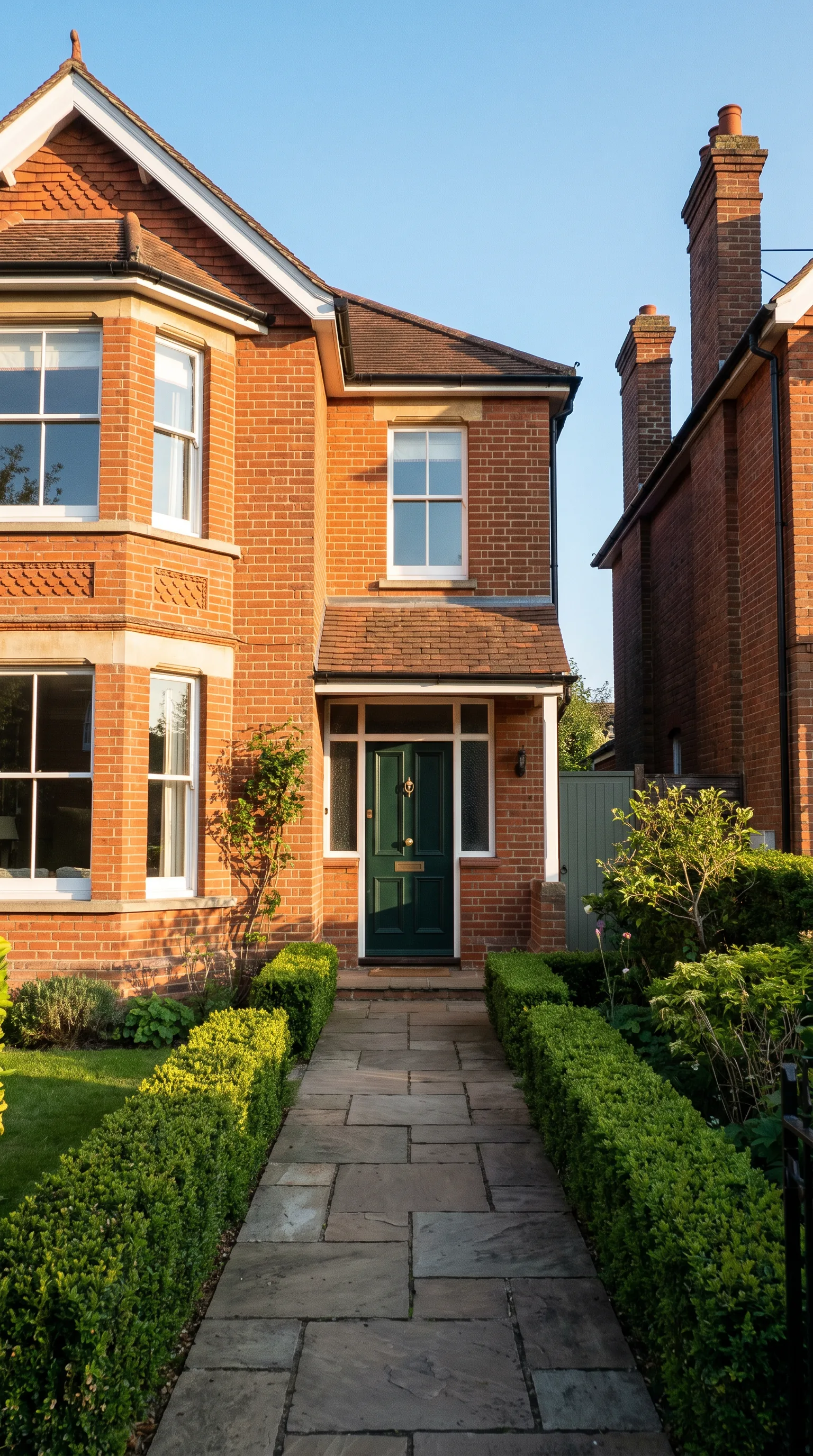
Why it works: it uses the agent’s own photo, so the house is the real house, and it adds the one thing a still can’t: the feeling of arriving.
Is it honest to use AI video in a property listing?
It can be, and it’s worth getting right, because a listing is a factual description of something people are about to spend a great deal of money on. A useful rule: AI can change how a home is shown, but never what the home is.
That means camera movement, light, music, weather and the time of day in an exterior shot are presentation. Adding a fourth bedroom, removing the electricity pylon behind the garden, widening a room or putting a view where there isn’t one is misrepresentation. Virtual staging sits in between: furniture in an empty room helps buyers imagine the space, but the photos and video should say clearly that the room has been staged digitally. Advertising and listing rules differ by country, state and MLS, so check what yours require before you publish anything AI-assisted.
Working from the agent’s own photos, as in the directed route above, is the safest way to keep a video true to the property. Prompts that describe motion and atmosphere rather than new features keep it that way.
Example: honest twilight conversion
Model: Nano Banana Pro (image) · Settings: 16:9, start from the agent’s daytime exterior photo
Prompt
Keep the house, windows, roofline, driveway and garden exactly as they are. Change only the time of day to dusk: deep blue sky with a little warm light on the horizon, interior lights on behind every window, porch light glowing, soft reflections on the driveway.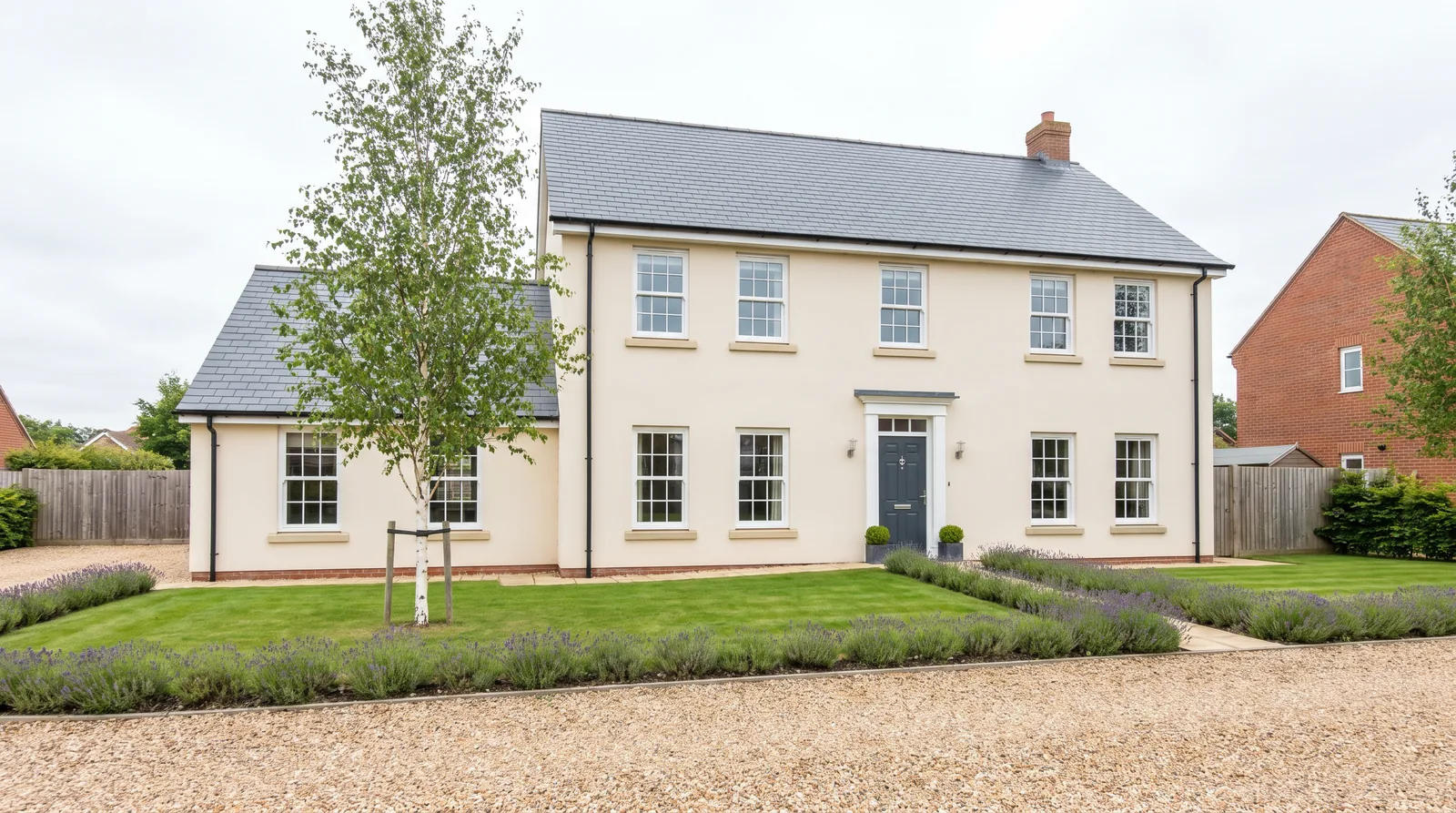
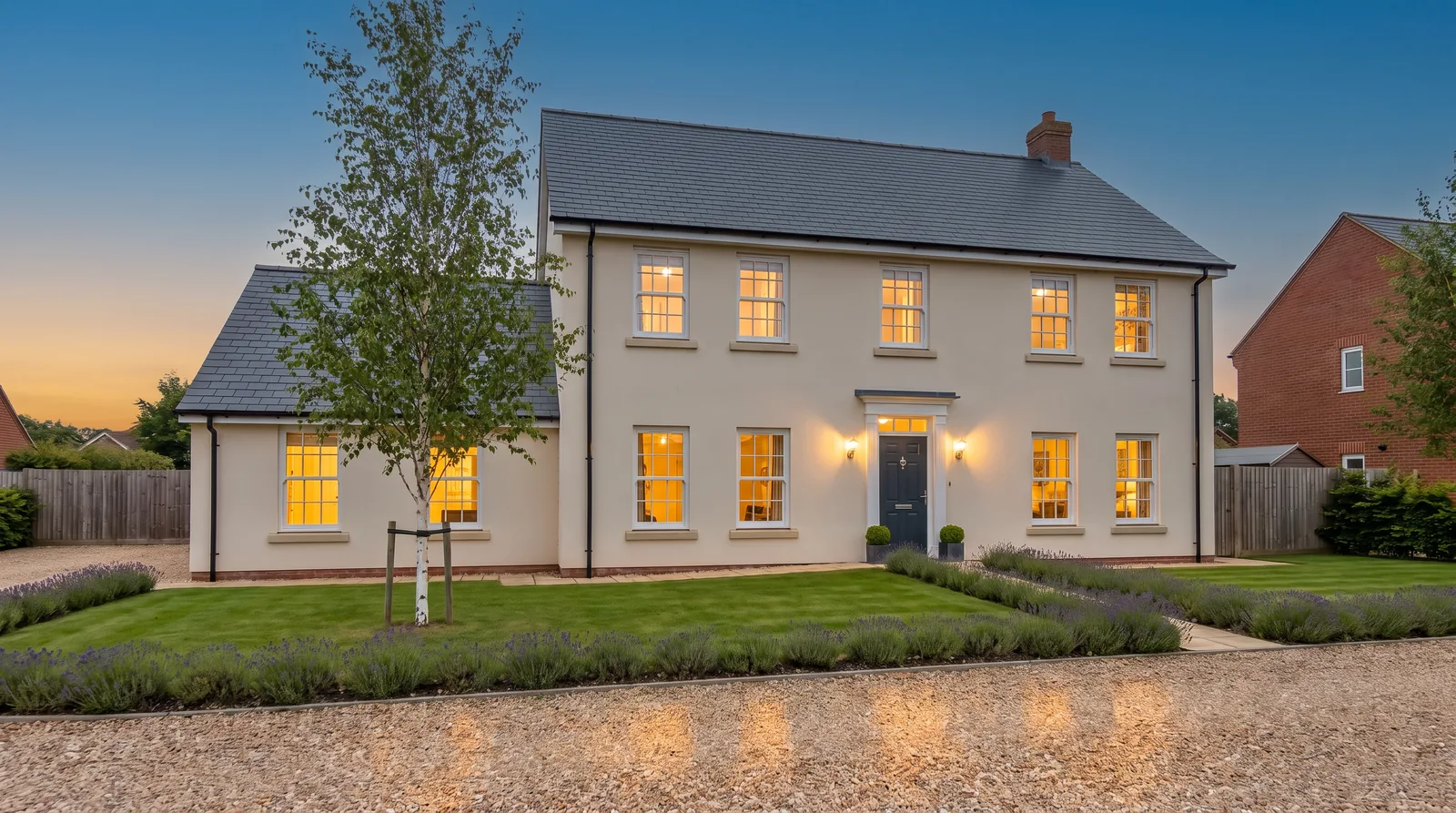
Why it works: the prompt names what must stay the same before it names the one thing that changes. Label the image as a digitally edited twilight in the listing. Editing an uploaded photo like this works in PromptWise’s image models, Nano Banana Pro included.
What can an agent make with AI video besides a listing tour?
The walkthrough is only one piece of property marketing. These are the other jobs where AI video earns its keep, with a PromptWise example for each. For paid listing promotion, the comparison of AI video tools for ads covers ad formats in more depth, and agencies handling property marketing for several clients can weigh up the AI video tools for marketing teams and agencies.
A hero shot for the listing page and portals
Every listing needs one moving image that sums the home up. For a family house it might be the garden at golden hour; for a city flat, the view from the balcony as the lights come on. Make it 16:9 for the listing page and a 9:16 version for social.
Example: balcony view reveal
Model: Kling 3.0 · Settings: 10 seconds, 16:9, start frame = agent’s balcony photo
Prompt
Slow dolly forward through the open balcony doors, revealing the city skyline at blue hour. Curtains move slightly in the breeze. Lights in distant towers flicker on one by one. Smooth, cinematic, no people.Neighbourhood and lifestyle B-roll
Buyers buy an area as much as a house. Short clips of the high street, the park, the station or the school run sell a postcode, and they can be reused across every listing in that area. Here AI doesn’t need a listing photo at all: text to video works, as long as the clip is clearly mood footage and not presented as the specific property.
Example: Saturday morning on the high street
Model: Seedance 2.5 · Settings: 15 seconds, 9:16, text to video
Prompt
A quiet residential high street on a sunny Saturday morning in autumn. Handheld walking shot past a bakery with a queue outside, a florist's buckets of flowers and a café with people at outdoor tables. Warm light, fallen leaves, relaxed pace. Ambient street sound, distant chatter and a coffee machine.Why it works: Seedance 2.5 generates sound with the picture, so the clip arrives with its own ambience instead of needing a soundtrack added later.
Open-house and “just listed” teasers
A teaser has one job: get people to book a viewing or turn up on Saturday. Keep it under 15 seconds, put the address and time on screen in the edit, and lead with the strongest shot.
Example: open-house teaser
Model: Seedance 2.5 · Settings: 12 seconds, 9:16, start frame = living-room photo, end frame = front-door photo
Prompt
Begin in the bright living room with a slow pan towards the bay window, then a smooth transition to the front door opening onto a sunny front garden. Upbeat, welcoming, natural daylight. Light acoustic music.Property ads for Meta, TikTok and YouTube
Paid social rewards variety: the same listing tested with three opening shots will usually find a winner faster than one polished ad. Because PromptWise runs several models side by side, you can make three versions of the first two seconds and let the ad platform decide.
Example: three ad openers from one photo
Models: Seedance 2.5, Kling 3.0 and Veo 3.1 Fast · Settings: 6–8 seconds each, 9:16, same start frame (kitchen photo)
Prompt (same for all three):
Fast, confident push-in across the kitchen island towards the garden doors, morning sun streaming in, a bowl of lemons on the worktop catching the light. Bright, fresh, energetic.Virtual staging from an empty-room photo
Empty rooms photograph badly: buyers struggle to judge scale, and a bare floor makes a room feel smaller than it is. PromptWise can edit an uploaded room photo to stage it virtually. Upload the agent’s photo of the empty room to an image model such as Nano Banana Pro (GPT Image 2.5 Flare is a second option in the same picker), describe the furniture and style, and say what must stay exactly as it is: walls, windows, flooring, doors and the view. For more on the technique itself, see the guide to virtual staging ai.
Two habits keep it honest. Stage furniture only, never fixtures, so no new fireplace, kitchen island or window. And label the image as virtually staged wherever it appears, including on portals and in social posts.
Example: staging an empty living room
Model: Nano Banana Pro (image) · Settings: 16:9, start from the agent’s photo of the empty living room
Prompt
Keep the walls, windows, skirting, wooden floor, radiator and the view through the window exactly as they are. Add a mid-grey three-seat sofa facing the window, a low oak coffee table, a wool rug in oatmeal, a floor lamp in the corner and two framed prints on the left wall. Scandinavian style, soft daylight, realistic shadows and scale.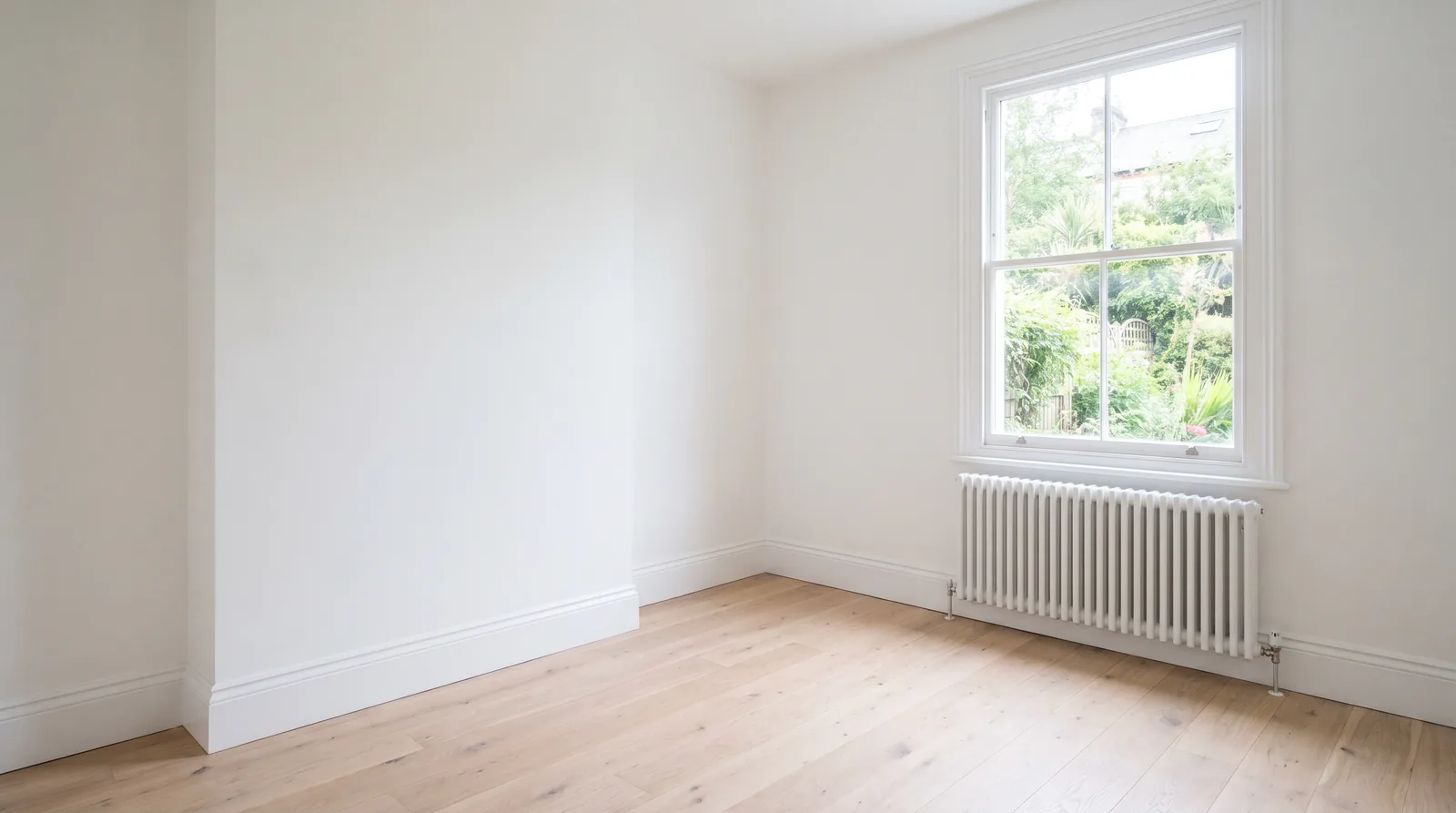
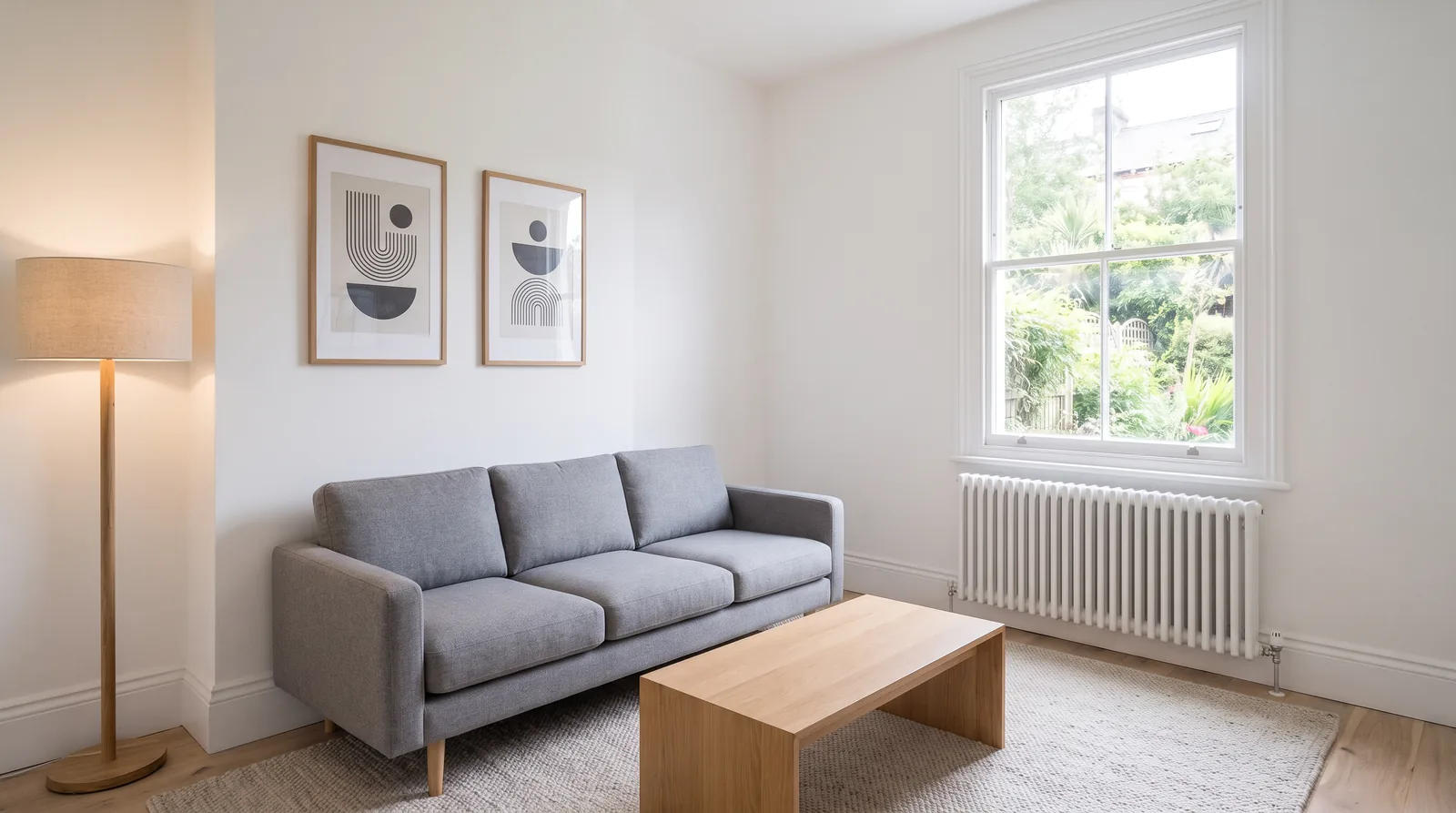
A staged still can then become the start frame for a slow Seedance 2.5 or Kling 3.0 move, so the walkthrough and the photos match. Label the video as virtually staged too.
Agent intros and market updates
For a short spoken intro, PromptWise can do it in Seedance 2.5: upload a photo of yourself as the image reference and your own recording (or an Elevenlabs voice) as the audio reference, and Seedance 2.5 lip-syncs the clip. For a weekly 60-second market update from a video-trained avatar of you, HeyGen’s Personal Avatar is built for exactly that, and honesty matters more than a sales pitch here. PromptWise is strong at everything around the presenter: the opening aerial-style shot of the area, the cutaways of sold homes, the voiceover with an Elevenlabs voice, and the music.
Example: market-update cutaway
Model: Veo 3.1 Quality · Settings: 8 seconds, 16:9, text to video
Prompt
Slow aerial-style glide over a leafy suburban street of semi-detached houses in early morning light, mist lifting from the gardens, a single car pulling out of a driveway. Calm, optimistic, soft ambient sound.Which PromptWise model suits which property shot?
There isn’t one best model for every room, so it helps to know where each starts. These notes come from each model’s settings in the PromptWise app and from the makers’ own descriptions; they aren’t benchmark scores.
| Property job | Model to start with | Why |
|---|---|---|
| Longer exterior or garden shots with sound | Seedance 2.5 | In PromptWise it runs from 4 to 30 seconds and generates sound with the picture |
| Crisp interior moves and short, fast ad openers | Kling 3.0 or Kling 3.0 Turbo | Kling 3.0 is strong on people and natural motion; Turbo is quicker for drafts |
| A moving shot that must land on a specific sound | Veo 3.1 Quality (or Fast and Lite for drafts) | Google built Veo 3.1 with native audio; clips are up to 8 seconds |
| Testing an idea before spending more credits | Seedance 2.0 Fast or Seedance 2.0 Mini | Quicker, lighter versions at 720p |
| 4K output for a large screen in the office window | Seedance 2.0 | Seedance 2.0 offers 4K in the app; Seedance 2.5 doesn’t |
| Twilight edits, virtual staging and hero stills | Nano Banana Pro, GPT Image 2.5 Flare, Seedream 5.0 Pro | Edit an uploaded listing photo; Nano Banana Pro goes up to 4K in PromptWise |
| Voiceover for a tour or market update | Elevenlabs v4, Elevenlabs v4 Turbo or Seed Audio 1.0 Speech | Narration in the same app as the pictures |
| Background music | CassetteAI Music or Seed Audio 1.0 Music | Music made to the length of the clip |
Our pick
Our pick for property video is Seedance 2.5. A walkthrough has to move like someone is actually walking through the house. Seedance 2.5 gives us the most believable camera moves, and a whole room can play out in one take of up to 30 seconds. That’s our opinion from daily use, not a lab test, and Seedance 2.5 does cost more per clip than Kling 3.0. For a hero shot that leads a listing, the extra is usually worth it; for ten quick social variations, Kling 3.0 Turbo or Seedance 2.0 Fast will stretch credits further.
Example: the same garden, two models
Models: Seedance 2.5 and Kling 3.0 · Settings: 10 seconds, 16:9, start frame = rear-garden photo
Prompt
Gentle crane-style rise from the patio, over the lawn, revealing the open fields behind the back fence. Golden hour, long shadows, a light breeze in the trees. Peaceful countryside sound.What does an AI real estate video cost?
Every tool here prices differently, so the honest way to compare is cost per finished thing.
PromptWise plans are monthly credit allowances, and every plan includes every model and every feature:
| Plan | Monthly | Credits per month |
|---|---|---|
| Starter | $19 | 275 |
| Plus | $39 | 800 |
| Pro (most popular) | $79 | 1,800 |
| Max (best value) | $149 | 3,800 |
| Max 2 / Max 3 | $249 / $349 | 6,500 / 9,500 |
Yearly billing saves up to 45%. Prices are in US dollars and exclude VAT.
In property terms, a typical listing package is three hero shots, one area clip and two edited stills, such as a virtually staged room and a twilight exterior. Video shots use far more credits than image edits, and longer or higher-resolution clips use more than short ones. Current credit costs for each model are on PromptWise’s pricing page, and the Generate button shows the exact cost before every generation.
So the right plan depends on how many listings go out in a normal month, and on how many takes each hero shot tends to need. A few practical notes: credits renew each billing month and unused credits don’t roll over, so pick the plan that matches a normal month rather than your busiest one. If a generation fails, its credits are refunded automatically. You can move up a plan in settings at any time when the spring market picks up.
For comparison, as each company published (checked 25 Oct 2026): Reel-E said its plans start at $44 a month and work out at roughly $9 to $15 per listing on yearly plans. AutoReel’s Essential plan was $30 a month billed yearly for 20 videos a year. HeyGen’s Creator plan was $29 a month and Pro from $49. Canva Pro was US$144 a year per person. CapCut Pro was USD 19.99 a month. Runway Standard was $15 a month. These are different products doing different jobs, so the lowest price on paper doesn’t always mean the lowest cost for the videos you actually need.
How do the other real estate video tools compare, honestly?
Each of these is a good product. Here’s where each one is genuinely strong for property marketing, where it falls short, and who should choose it over PromptWise.
HeyGen
Real strength: presenter video. HeyGen’s library has 1,100+ stock avatars, a photo avatar can be made from one front-facing photo, and a Personal Avatar is created from a short video of you, so your face and voice can front a market update every week without a camera. Its own site lists real estate listing and update videos as a use case: property details turned into a walkthrough your avatar presents. Videos translate into 177+ languages, which helps agents selling to international buyers. Pro plans also include Seedance 2.5, Veo 3.1 and Nano Banana, and monthly credits roll over for one month.
Where it falls short for property: it’s built around a person talking. The cinematic exterior, the garden reveal and the twilight edit are possible, but they aren’t what the product is designed around.
Choose HeyGen if the agent is the brand and you want a face on screen more than you want the house on screen.
Reel-E
Real strength: speed from photos to a complete listing package. Upload the photos and Reel-E cuts a video with camera motion and music, edits photos from a sentence (twilight, staging, cleanup) and builds a single-property website with view and lead analytics. Its Keylight Studio and AI Director let you change the cut by hand or by asking. It exports for Instagram, TikTok, YouTube and MLS.
Where it falls short: you’re working within Reel-E’s editing style rather than directing each shot, and it’s a real estate tool only, so it won’t help with the rest of your content.
Choose Reel-E if you want every listing to have a video and a website by the end of the day and don’t want to write prompts.
AutoReel
Real strength: a production line for property-media businesses. Import photos straight from Realtor.com, turn them into portrait or landscape tours, add AI virtual staging, twilight and lawn edits, AI voiceovers (including a clone of your own voice) and AI avatars. Higher plans let you set start and end frames per clip, and video credits roll over for a year on its yearly plans.
Where it falls short: pricing is per video with a yearly allowance, which suits a steady listing pipeline better than occasional creative work, and it’s focused on property tours rather than general social content.
Choose AutoReel if you’re a photographer or media company delivering listing videos to many agents.
Canva
Real strength: brand control across a whole brokerage. Canva Listings auto-fills brand templates with live MLS data, photos and agent details, and Canva lists large brokerages among its customers. Canva AI’s “Create a Video Clip” makes clips of up to eight seconds from a prompt, with synchronised audio, and talking heads can be made from a photo or an AI avatar.
Where it falls short: short AI clips are one feature inside a design tool. For longer directed shots or choosing between video models, you’ll need something else.
Choose Canva if your brochures, signboards, social posts and brand kit already live there and consistency across agents matters most.
CapCut
Real strength: editing. CapCut’s desktop, online and mobile editors cover trimming, captions, templates and text to speech, and its AI video generator, powered by Seedance 2.5, works from a script or a reference image. Pro includes 1,200 monthly AI credits.
Where it falls short: model choice is narrower, and it’s at its best finishing footage rather than generating a full set of listing shots.
Choose CapCut if you film on your phone and want AI clips, captions and an editor in one place. It also pairs well with PromptWise: generate the shots in PromptWise, cut them in CapCut.
Runway
Real strength: Runway’s own models, Gen-4.5 and Aleph 2.0, plus Runway Ads for making and testing ads, apps for iOS and Android, and up to 20 parallel generations on its Max plan.
Where it falls short: it isn’t built around property work, and its own models aren’t available anywhere else, including PromptWise.
Choose Runway if you specifically want Gen-4.5 or Aleph 2.0 for creative projects.
What makes a good AI property video prompt?
Property prompts go wrong in predictable ways: they describe the house again (and the model changes it), they ask for three camera moves in one clip, or they forget the light. Keep each prompt to one shot, one camera move and one mood. Swap the parts in square brackets for your listing.
- Arrival: “Slow push-in up the path to the [front door colour] front door of the [house type], eye-level, [time of day] light from the [direction], [one moving detail: hedge, flag, trees]. Calm and welcoming. Quiet street ambience.”
- Room reveal: “Smooth pan from the [starting feature] to the [hero feature] in the [room], natural daylight through the [window type], dust motes in the light. Unhurried, warm. No people.”
- View: “Slow dolly through the [doors or window] revealing the [view] at [golden hour or blue hour]. Light breeze. Cinematic and still.”
- Area mood clip (text to video): “Handheld walk along [type of street] in [season], past [two local businesses], [weather], relaxed pace, ambient sound of [local sounds].”
- Twilight still (image edit): “Keep the house, windows, roofline and garden exactly as they are. Change only the time of day to dusk, interior lights on, porch light glowing.”
Set the aspect ratio before you generate, not after: a 16:9 clip cropped to 9:16 loses most of the picture and often the front door.
Example: room reveal template, filled in
Model: Seedance 2.5 · Settings: 8 seconds, 9:16, start frame = agent’s kitchen photo
Prompt
Smooth pan from the range cooker to the bi-fold doors in the kitchen, natural daylight through the roof lantern, dust motes in the light. Unhurried, warm. No people.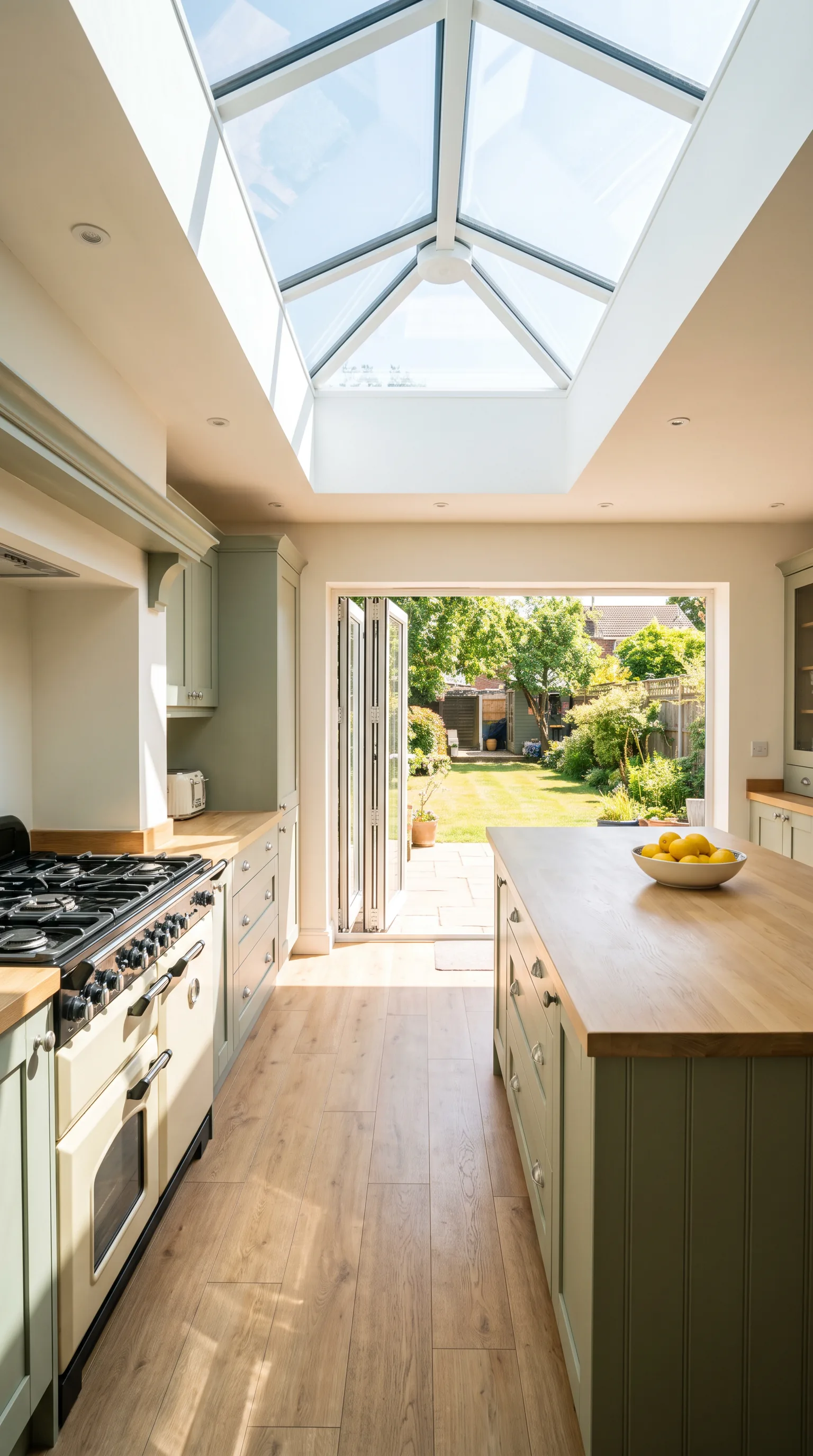
Why agents choose PromptWise for property video
- A model matched to each shot. Seedance 2.5 for a hero shot with sound, Kling 3.0 for a quick, crisp camera move, Veo 3.1 for a short moment with audio, so one listing photo can be tried more than one way and the best take kept.
- Images and sound in the same app. Twilight edits, virtual staging and hero stills with Nano Banana Pro, GPT Image 2.5 Flare or Seedream 5.0 Pro, narration with Elevenlabs v4 and Elevenlabs v4 Turbo, and music with CassetteAI Music.
- Every model on every plan, from $19 a month. You choose how many credits you need, not which models you’re allowed.
- Ready the moment you sign up. Every model is available straight away, with no waitlist.
- Repeatable workflows. Flows, PromptWise’s node-based canvas, connects prompts, images, videos and models into a workflow you can save and rerun for the next listing.
- You own what you make. Everything you generate comes with a full commercial AI licence, so it can go on portals, social ads and your own site.
More answers: model access, plans and credit costs are on PromptWise models and pricing
Listing stills, video and voiceover in one studio, from $19 a month. · See plans
Related: Plans and every model’s credit cost · Cinematic AI video prompts · Best AI video generator for marketing · Best AI video generator for ads · Best AI video generator for TikTok
FAQ
What's the best AI video generator for real estate listings?
It depends on the job. PromptWise is the best fit for directed listing shots, neighbourhood clips and property ads made from your own photos, with stills, video and sound in one studio and Seedance 2.5, Kling 3.0 and Veo 3.1 on every plan. HeyGen suits presenter-led market updates, and Reel-E or AutoReel suit full listing videos built automatically from a photo set.
What's the best AI photo generator for real estate?
For editing your own listing photos, use an image model that keeps the real room intact. In PromptWise, Nano Banana Pro (up to 4K), GPT Image 2.5 Flare and Seedream 5.0 Pro can edit an uploaded photo for twilight versions, virtual staging and hero stills. Name what must stay the same before the one thing that changes, stage furniture only, and label staged or edited images.
Can AI make a video from listing photos?
Yes. In PromptWise you upload a listing photo as the start frame, choose a video model such as Seedance 2.5 and describe the camera move, for example a slow push-in to the front door. Batch tools such as Reel-E and AutoReel instead turn a whole photo set into one listing video.
Is it allowed to use AI video in a property listing?
Generally yes, as long as the video doesn't misrepresent the property. Changing camera movement, light or time of day is presentation; adding features, removing problems or faking a view is not. Label virtual staging and digitally edited images, and check your local advertising and MLS rules.
Which AI model is best for real estate video?
Seedance 2.5 is our pick for hero shots: in PromptWise it makes clips of 4 to 30 seconds and generates sound with the picture. Kling 3.0 is a strong choice for crisp interior moves, and Veo 3.1 for short shots where the sound has to land on cue. Seedance 2.0 can output 4K.
Are video-editing skills needed?
No. PromptWise needs no coding or editing skills: you pick a model, add a photo, write what should move and generate. For joining clips together with titles and the address on screen, any simple editor works.
What can an agent make with AI video besides a listing tour?
A hero shot for the listing page and portals, neighbourhood and lifestyle clips that sell the area, open-house and just-listed teasers, property ads for Meta, TikTok and YouTube, and virtually staged walkthroughs. Neighbourhood clips can be made from text alone, as long as they're presented as mood footage rather than the property itself.
Which aspect ratio should a listing video use?
Set it before you generate: 9:16 for Reels, TikTok and Shorts, and 16:9 for YouTube and the listing page. A 16:9 clip cropped to 9:16 loses much of the picture, often including the front door, so make a separate version for each format when the shot matters.
Sources
We checked these official pages on the dates shown. Prices and specs can change, so check the provider's page before you buy.
- HeyGen pricing (Checked 25 Oct 2026)
- HeyGen: AI avatars (Checked 25 Oct 2026)
- Reel-E homepage and FAQ (Checked 25 Oct 2026)
- AutoReel homepage (Checked 25 Oct 2026)
- AutoReel pricing (Checked 25 Oct 2026)
- Canva: real estate solutions (Checked 25 Oct 2026)
- Canva: AI video generator (Checked 25 Oct 2026)
- Canva pricing (Checked 25 Oct 2026)
- CapCut: AI video generator (Checked 25 Oct 2026)
- CapCut pricing (Checked 25 Oct 2026)
- Runway pricing (Checked 25 Oct 2026)