AI clothing model photos: put your garments on a model, then make the lookbook move
By Daniel Riley · Published · Updated
In short: To make AI clothing model photos, photograph the real garment, attach it to Nano Banana Pro together with a reference image of your model, and ask for that same person wearing it in a new setting. For a lookbook clip, animate the approved still in Kling 3.0 or Seedance 2.5. Check fit, drape, print and fastenings against the real piece before anything goes on a product page.
A traditional on-model shoot means a model, a photographer, a stylist, a studio and a long day for one capsule collection. AI changes which of those you need for each picture. It doesn’t change the job itself: shoppers still need to see how a piece fits, how it falls and how it moves.
Here is how we’d do that in PromptWise for clothing and jewellery: building a model you can reuse, dressing them from photos of your own stock, turning the best stills into lookbook video, and the checks to run before publishing. If you need packshots and flat lays without a person, our product photography guide covers those.
What an AI clothing model is actually for
Three jobs come up again and again:
- On-model photos for product pages. The same person, the same set of poses, every colourway.
- Campaign and lookbook images. Locations you’d never fly a crew to for a twelve-piece drop.
- Fashion video. A turn, a walk or a hem catching the wind, for reels, product pages and paid social.
Jewellery is the fourth, with its own problem: scale. A ring, an ear stack or a pendant has to sit on a hand, an ear or a collarbone at a believable size, and that matters more than any styling choice.
Build one model and keep them
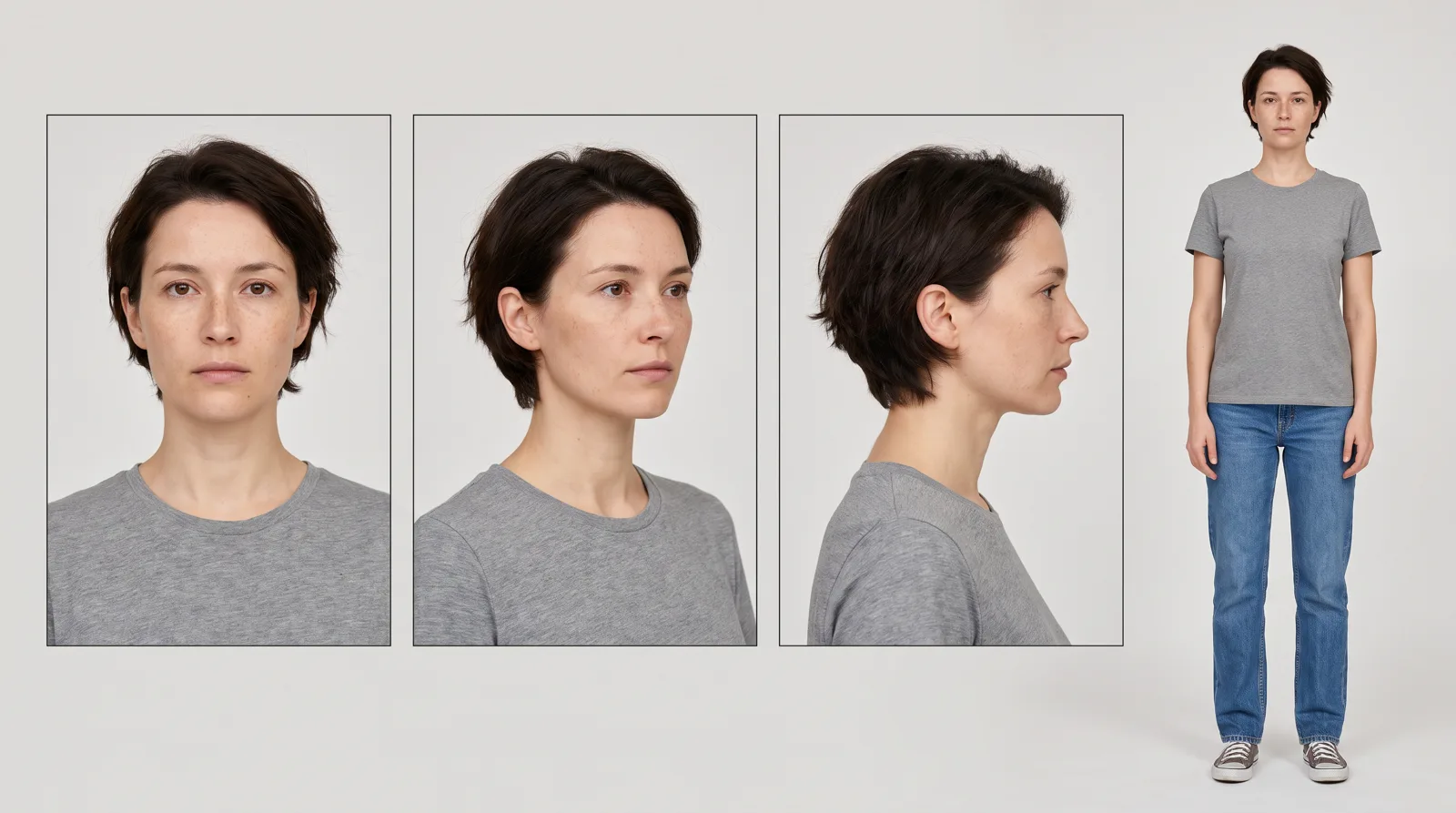
What makes a set of images feel like one catalogue is the same person in every shot. So before any garment, we make the model.
- Generate a reference sheet in Nano Banana Pro, or in Realism Pro when the shot is mostly about the person: front, three-quarter, profile and full length, on a plain grey background, in simple fitted clothes.
- Write a short description you’ll paste into every later prompt, covering age range, hair, build and two or three distinctive features.
- Save the sheet in Studio and attach it to every generation that follows.
Cast for the people who buy from you. If the range runs from size 8 to size 22, show it on more than one body, and generate each size from its own reference rather than stretching one model to fit. A garment shown only on a single build tells half the shoppers nothing.
Dress the model from your garment photo
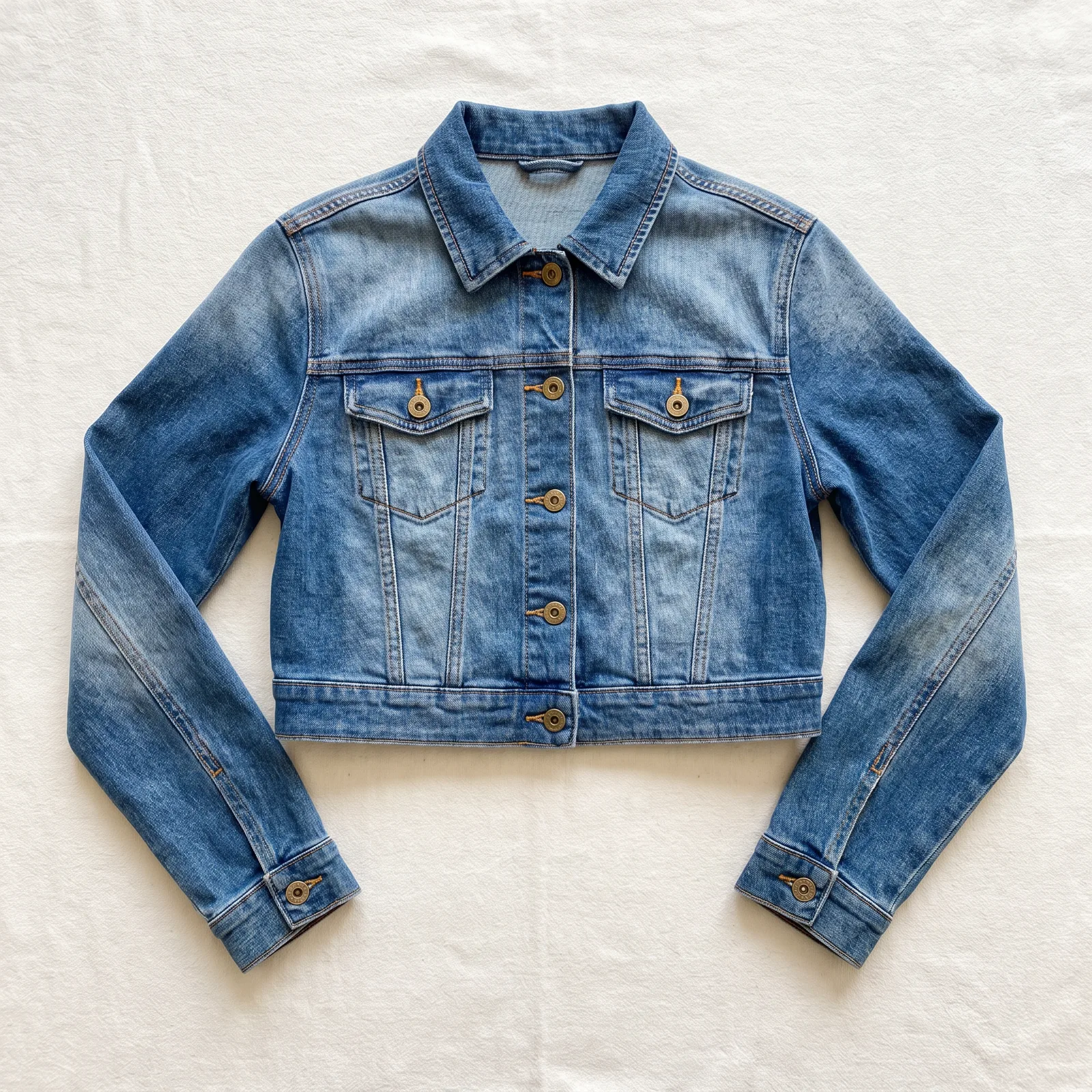
Describing a jacket in words gets you a jacket. Attaching a photo of the jacket gets you your jacket, with the right buttons.
- Photograph the garment flat or on a hanger, against a plain background, front and back, in daylight so the colour is true.
- Add a close-up of the fabric, the print and any hardware such as zips, buttons or clasps.
- Attach everything to Nano Banana Pro. you can give Nano Banana Pro as many as 10 images in a single PromptWise generation, so the model sheet and four or five garment shots fit comfortably.
- Give every image a role in the prompt, so the model knows which picture is the person and which is the clothing.
Prompt
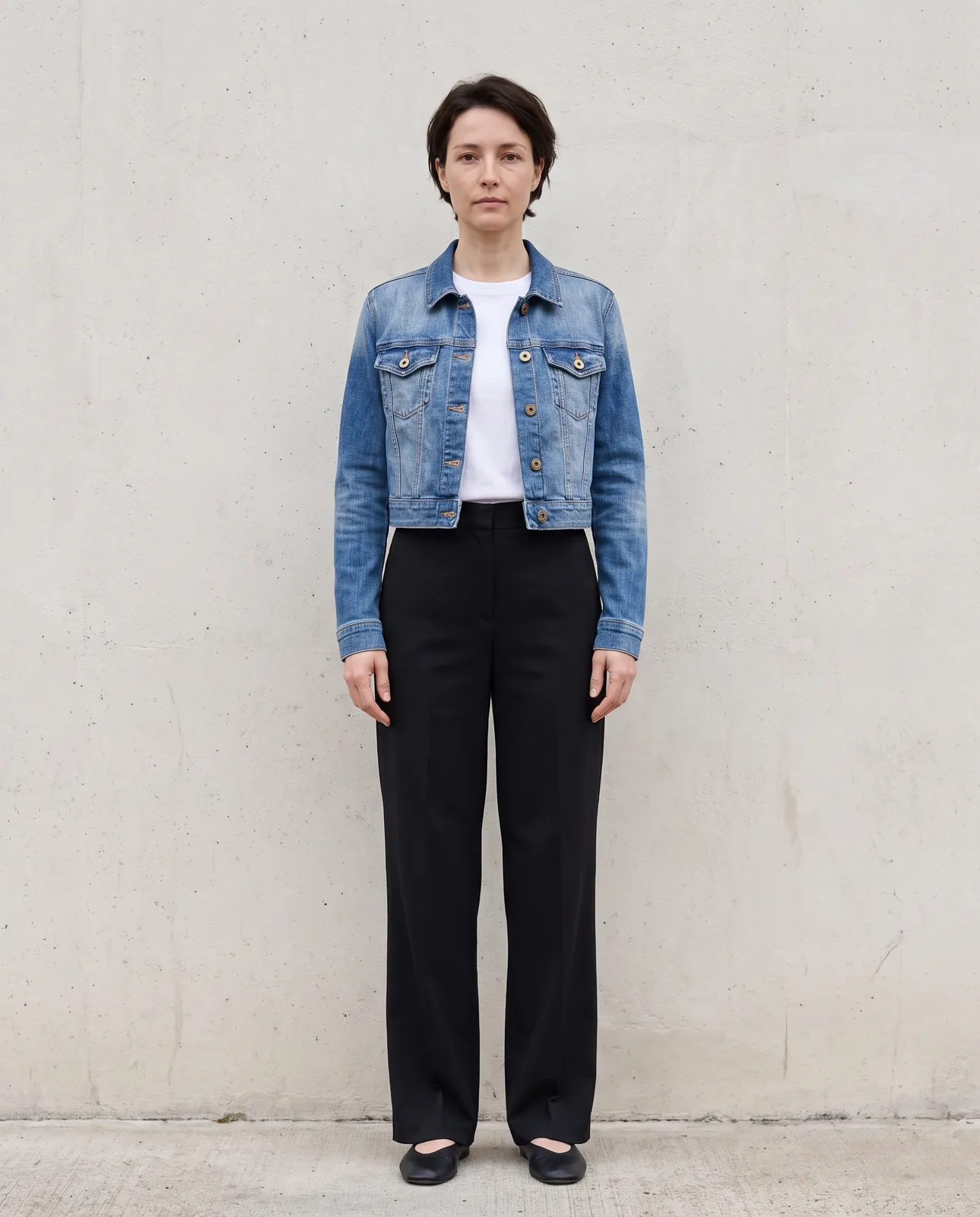
Image 1 is the model. Image 2 is a flat photo of a cropped denim jacket. Show the same woman wearing the jacket open over a white T-shirt and black straight-leg trousers, standing against a pale concrete wall in soft overcast light. Keep the jacket's wash, fading, contrast stitching, chest pockets, brass buttons and cropped length exactly as in the photo. Keep her face and short dark hair the same. Full length, natural pose, realistic fashion e-commerce photography, 4:5. No text.Run it a few times and pick the version that is most faithful to the garment, not the most flattering one.
Prompts for on-model and campaign shots
Swap in your own garment and reference images. The structure matters more than the words.
Prompt
Full-length studio photo of the model from image 1 wearing the cable-knit cardigan from image 2, buttoned, with straight dark jeans, standing relaxed with her weight on one leg, plain warm-grey backdrop, a large soft light from the front left, a gentle floor shadow, 4:5, for a product pagePrompt
Three-quarter shot of the same model crossing a zebra crossing in east London on a bright winter morning, wearing the camel wrap coat from image 2 with the collar turned up, a little movement in the hem, 50mm lens, natural colourPrompt
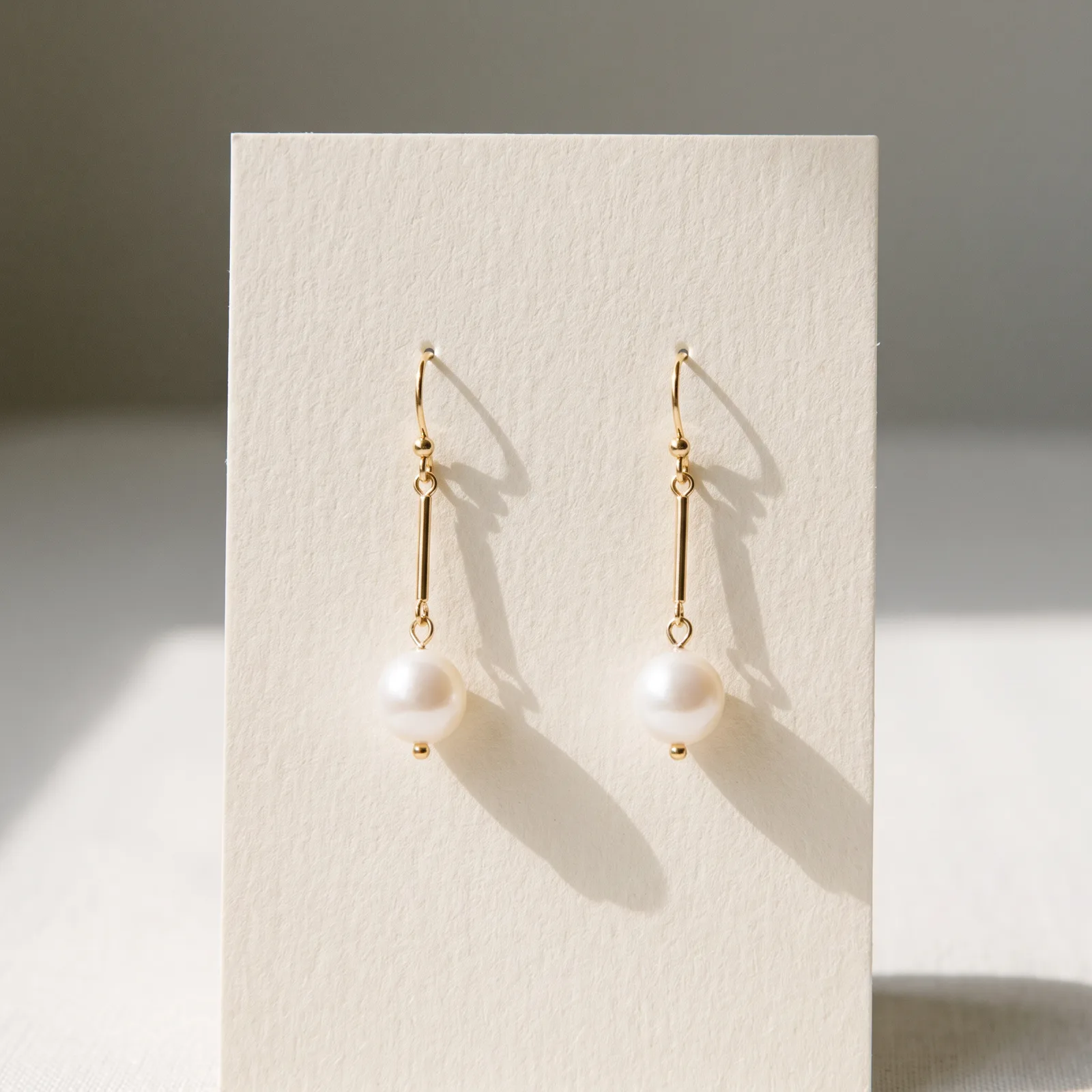
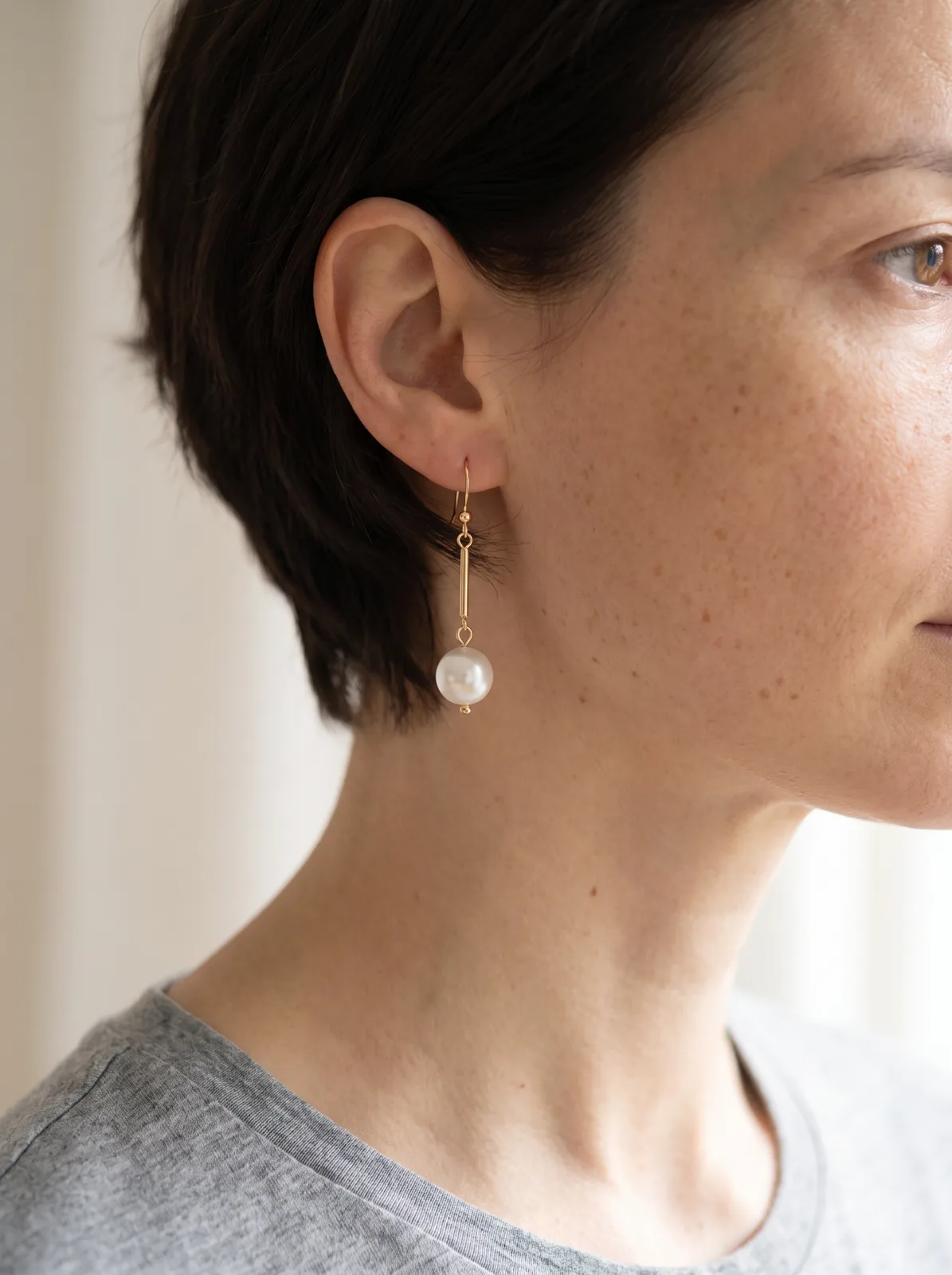
Close-up of the model's ear and jawline wearing the pearl drop earrings from image 2, hair tucked behind the ear, soft window light from the right, natural skin texture, 100mm lens, 3:4Prompt
A relaxed hand resting on the edge of a marble café table, wearing the silver signet ring from image 2 on the little finger, the ring sized realistically against the knuckle, soft daylight, shallow depth of fieldFor jewellery, always say where the piece sits and how big it should look against the body. Left to itself, a model will happily make a delicate chain chunky or a stud the size of a coin.
Fashion video: lookbook clips that move
Use the approved still as the start frame, so the video begins with a picture you’ve already checked. Then give the clip one movement: a slow turn, a walk towards the camera, a coat lifting in the wind.
| Clip | Model in PromptWise | Why we’d use it |
|---|---|---|
| A turn that shows the front, side and back | Kling 3.0 | Good with people and physical motion, and it takes a start and an end frame |
| A runway-style walk with music, up to 30 seconds | Seedance 2.5 | Long takes with sound; attach the model sheet and garment photos as references |
| Copying a particular walk or pose sequence | Kling 3.0 Motion Control | Lets you direct a character through a set motion; clips run 3 to 30 seconds and are silent |
| A vertical clip at 4K | Kling 3.0 4K | Up to 4K, in 9:16 for reels and stories |
| The model saying a line about the piece | Seedance 2.5 with Elevenlabs v4 | Lip-syncs an image of the model to an audio clip |
A trick with Kling 3.0: set the front view as the start frame and the back view as the end frame, and the model fills in the turn between them. Both ends of the clip are then images you’ve approved.
Prompt
The model from the start frame turns slowly on the spot through a full circle, the linen dress swinging gently at the hem, plain white studio, soft even light, camera locked off, 9:16, 8 secondsPrompt
The model walks towards the camera along a wet pavement at dusk, the trench coat moving with each step, shop lights reflecting in the puddles, the camera tracking back at walking pace, quiet street soundChecks before you publish
| Check | What to look for |
|---|---|
| Fit and length | Hems, sleeves and waistbands sit where they sit on the real piece |
| Drape and fabric | Heavy fabrics hang, and sheer ones show exactly what they really show |
| Print and pattern | Pattern scale and placement match, and logos aren’t redrawn |
| Fastenings and details | Button count, zips, pockets and stitching colour |
| Colour | Matches the garment in daylight, not a flattering version of it |
| Jewellery scale | Stone size and chain length are plausible on the body |
| Hands | Five fingers, and rings on the finger you intended |
| Platform rules | Check the image rules of each marketplace and ad platform you publish on |
An image that flatters the garment more than reality does sells it once and brings it back as a return. The point of the model is to show the piece as it is.
Example media
More answers: packshots and flat lays are in AI product photography: replace photoshoots · AI influencer generator · realistic AI people prompts · plans and what each model costs: PromptWise models and pricing
Dress your first AI model from a photo of your own stock, on one plan from $19 a month. See plans
FAQ
What's the best AI video generator for fashion lookbooks?
We'd build the lookbook in PromptWise: dress one consistent model from your garment photos in Nano Banana Pro, then animate the approved stills in Kling 3.0 for turns and walks, or in Seedance 2.5 for longer clips with music. Every look in the video then matches a still you've already checked.
What's the best AI video tool for fashion brands?
One that keeps the same model and the real garment consistent from stills to video. In PromptWise every image and video model sits on one plan, so the reference photos behind your product shots can feed your clips as well, and Seedance 2.5 can lip-sync the model to an Elevenlabs v4 voiceover.
How do I make an AI fashion model?
Generate a reference sheet of one person in Nano Banana Pro or Realism Pro, showing the front, three-quarter, profile and full length on a plain background. Save it in Studio and attach it to every later shot along with the same short description of their hair, build and features, so they stay the same person across the catalogue.
Which AI video model is best for fashion videos?
Kling 3.0 for most fashion clips, because it's good with people in motion and takes both a start and an end frame, so a turn can open on the front of an outfit and finish on the back. We use Seedance 2.5 for takes of up to 30 seconds with music, and Kling 3.0 Motion Control to copy a particular walk.