How to Make AI UGC Ads That Feel Real, From the Brief to the Final Cut
By Daniel Riley · Published
In short: To make an AI UGC ad, write a one-page brief, build one consistent AI creator, script a hook for the first two seconds, then turn stills into talking and demo shots and cut them with captions. This guide has hooks, scripts and prompts to copy, the PromptWise model that suits each shot and a 25-second worked example. The AI creator always presents the product and never gives a testimonial.
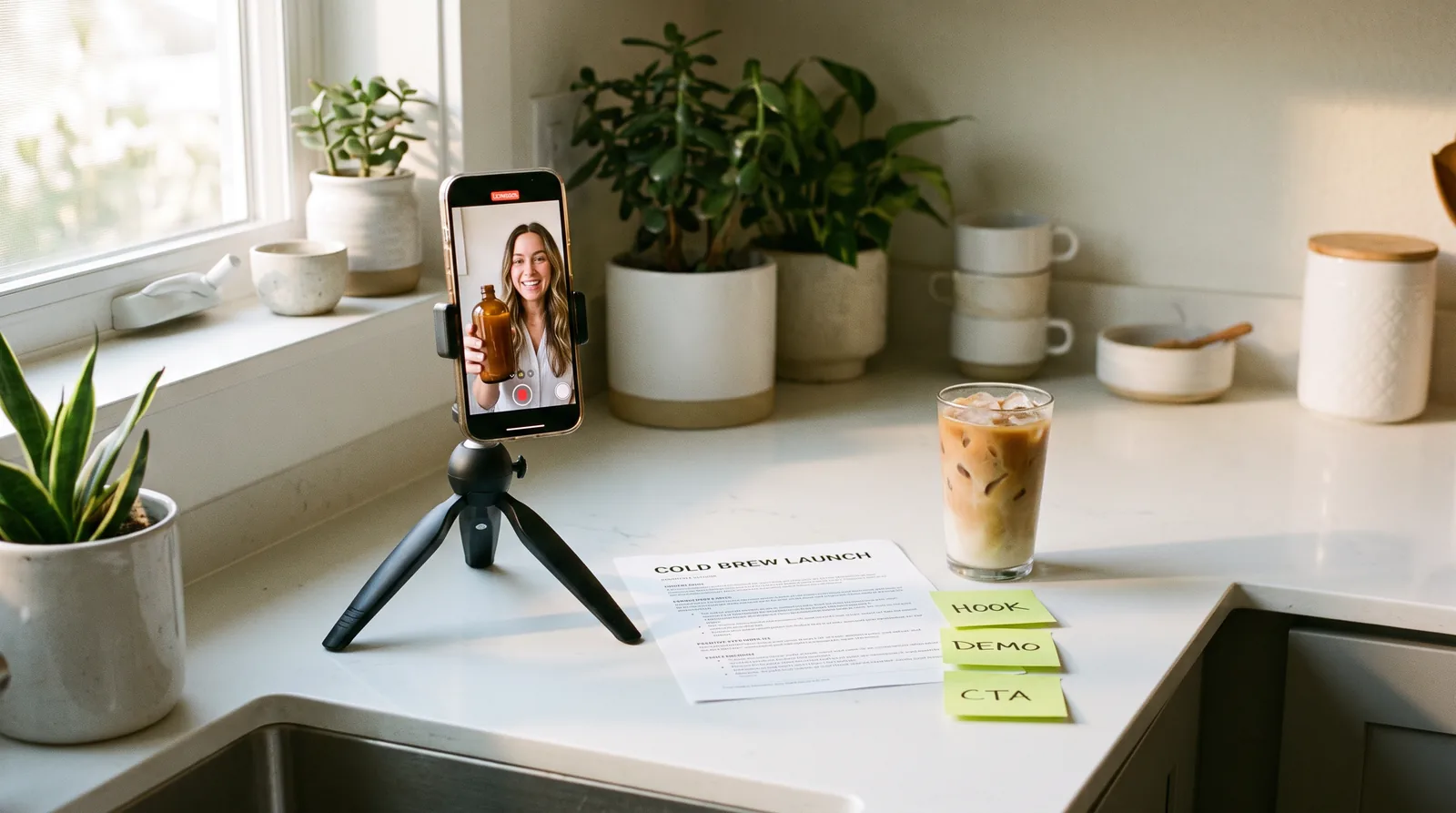
UGC ads are the ones that don’t look like ads. Somebody holds a product up to their phone in a kitchen or a car or a bathroom, talks to you as if you were a friend, shows you the thing working and then gets out of the way. They’re popular with brands because they sit comfortably in a feed full of real people, and they’re popular with performance marketers because they’re quick to make in lots of versions, which is what testing needs. The catch has always been the people. Finding creators, sending them product, waiting for footage and paying for reshoots when the hook doesn’t land is slow, and it gets slower the more variations you want.
AI changes the slow part. With an image model you can design a creator who looks the way your audience looks, keep that face the same across every ad, and turn stills into talking, moving shots with a video model, all without a shoot. What AI doesn’t change is the craft around it. A UGC ad still lives or dies on the first two seconds, on a script that sounds like speech rather than copy, and on a demo that shows the product doing its job. Get those wrong and the most realistic AI creator in the world won’t save the ad.
This guide walks through the whole process the way it works in PromptWise, from a one-page brief to a finished 25-second ad. Along the way there are hooks and scripts you can copy, prompts for building a consistent AI creator and turning it into video, a clear view on which of the app’s models suits which shot, and a section on keeping all of it honest, because an AI creator should never be passed off as a real customer.
What makes an ad feel like UGC
It helps to be precise about what “UGC style” actually means before trying to recreate it, because most of it has nothing to do with the camera. A real creator video is filmed on a phone, usually held at arm’s length or propped on something, in an ordinary room with whatever light happens to be there. The framing is a little loose, the person looks straight into the lens, and they talk in short, plain sentences with the odd pause or half-laugh. Nothing about it is lit like a commercial, and that’s the point. The moment an ad starts to look polished, people’s ad radar switches on and they keep scrolling.
The structure is just as recognisable. There’s a hook that gives you a reason to stop, a short stretch where the product is shown being used, and a closing line that tells you what to do next. Sometimes there’s a problem first and the product arrives as the fix, and sometimes it’s a list (“three things that…”), but the shape is almost always hook, show, ask. A 20 to 30-second ad has room for four or five shots at most, so every one of them has to earn its place.
That gives you a useful checklist for AI versions. The creator should look like a person rather than a model in a campaign, the setting should be an everyday room with some mess in it, the camera should feel handheld or propped, and the speech should sound like somebody talking. When an AI UGC ad feels off, it’s nearly always because one of those has slipped: the skin is too perfect, the kitchen looks like a show home, or the creator is reciting a tagline.
Start with a one-page ad brief
Every good UGC ad starts on paper, and with AI that matters even more, because the brief is where your prompts come from. If you know exactly who the ad is for and what it has to prove, the creator, the setting and the script almost write themselves. If you don’t, you end up generating twenty lovely clips that don’t add up to an ad.
The brief doesn’t need to be long. One page is plenty, and it should answer seven questions. Who is this for, described as a real person rather than a demographic? What problem do they have that the product solves? What’s the one thing the ad has to show, the moment that makes someone believe it works? What’s the single message, in a sentence? Where will it run and in what format? What should the viewer do at the end? And who’s the creator, in a line or two, so the face matches the audience?
Here’s a template you can copy and fill in. It’s deliberately plain so you can paste it straight into a note or a doc.
Prompt
Product: what it is, in one line.
Audience: one real-sounding person, their age, their day and what annoys them.
Problem: the thing they're fed up with, in their words.
Proof moment: the one shot that shows the product working.
Message: one sentence the viewer should remember.
Placement and format: for example, Reels and TikTok, 9:16, 20 to 30 seconds.
Call to action: what they should do next, in five words or fewer.
Creator: who's talking, what they look like, where they're filming.
Must include / must avoid: brand name, claims you can and can't make, anything legal.
The “must avoid” line deserves more attention than it usually gets. Write down any claim you can’t back up, because an AI creator will happily say anything you put in the script, and it’s much easier to keep an unprovable line out of the brief than to notice it in the fourth version of the edit.
A filled-in brief for the worked example later on looks like this. NORTHBOUND (an invented brand for this guide) sells a cold brew coffee concentrate in an amber glass bottle. The audience is someone in their late twenties who buys an iced coffee on the way to work most days and is starting to notice what it costs. The proof moment is pouring a measure of concentrate over ice and topping it with milk in under ten seconds. The message is that café-style iced coffee at home is quicker than the queue. It runs on Reels and TikTok at 9:16, the call to action is “Get yours at the link”, and the creator is Maya, a relaxed, friendly woman in her late twenties filming in her own small kitchen.
Hooks: the first two seconds
This is what the NORTHBOUND ad looks like arriving on someone’s phone at quarter past eight on a Tuesday. They’re on a train, and they’ve scrolled past four other ads since the last stop. Whatever is on screen in the first two seconds has to stop them swiping on by. And, of course, this is also by far the easiest part of the ad to change, as a new hook is typically just a new clip, not a whole new ad. So it’s something to give a lot of thought to.
What stops someone scrolling? A thought they’ve had themselves being said out loud, an unusual image, a promise delivered quickly, or even just being named. Opening with a brand name or “Hi guys, so today…” hardly ever works, because no one stops scrolling to hear a greeting.
The hook is also a picture. If Maya is halfway through the pour, that’s what the opening frame should show. Or the ad could start with Maya holding the bottle up to the lens, so close that it’s slightly soft. Either shot makes the hook line stronger than it would be read over a frame where nothing is happening.
Here are 15 opening lines to use as inspiration, arranged in four rough families. Each family sticks to a fairly narrow kind of line, so within it the hooks are similar and it’s easy to see how they vary. They’re all lines a presenter could say, not claims about anyone’s own experience, which matters for reasons covered further down. Swap the square brackets for your own product.
Call-outs
- “If your iced coffee habit costs more than your phone bill, watch this.”
- “If you’ve got a [specific situation], this one’s for you.”
- “Quick one, because you’re busy.”
Quick promises
- “Here’s the ten-second version of a café iced latte.”
- “The fastest way to [result], start to finish.”
- “Watch what happens when you [simple action].”
- “Two ways to make [result]. One takes ten minutes, one takes ten seconds.”
A little tension
- “Stop doing [common habit]. Do this instead.”
- “Most people use [product type] wrong. Here’s the easy way.”
- “You don’t need [expensive thing] to get [result].”
Curiosity
- “Three things to know before you buy another [product type].”
- “This is what [product] actually looks like in a real kitchen.”
- “Here’s why [product] comes in [unusual format].”
- “This is the bit nobody shows you.”
- “Before you scroll: [one surprising fact you can prove].”
As for how to use them: call-outs are more powerful when narrower, so “if you’ve got a dog that hates the car” is worth testing against “if you’ve got a dog”. Quick promises only work if the ad actually delivers fast, so save them for products with a moment like a pour, a click or a fold. Tension lines need a light touch, as there’s not much distance between a nudge and a telling-off. And “before you scroll” is only as good as the fact behind it, which should be one you’d be happy to defend if someone asked where it came from.
Use these as the basis for five or six different hooks for each ad, and pick the best one to write the rest of the script around. The others become your first test.
Writing a script that sounds like a person
Writing a UGC script means writing to be heard, not read. If you were explaining something to a friend sitting in a kitchen, you’d use short sentences, very ordinary language, contractions, the occasional fragment, and none of the adjectives grabbed from the back of the packaging. The best test of all is to read your lines out loud before you even think about writing a prompt. If you get out of breath in the middle of a line, that line needs rewriting. If the whole lot sounds like a dreadful 1990s radio advert, start again from the beginning. Relaxed speech runs at roughly two to three words a second, so a 25-second ad has room for about 50 to 75 spoken words, and fewer if part of it is a silent demo.
Most UGC ads run along the lines of hook, problem, demo, proof and then the ask, but in a short ad there isn’t room for a whole line each, so lines double up. Take the desk box in Script B. “If your desk looks like this by Wednesday” is the hook and the problem in one go, and the box opening up is the solution, which the viewer gets to see working for themselves. Describe the problem the way your customer would complain about it to friends and family, then show the product working rather than talking about it. The proof needs to be something the viewer can see, as simple as how fast something opens or the colour of a drink, rather than a promise they have to believe. The call to action can be as short as four words.
In every script below, the speaker is a presenter showing off a product, not a customer giving a testimonial. A real customer saying “I’ve been using this for six months and my skin has never looked better” is fine, because it’s true. The same words from an AI creator make a fake testimonial, since the speaker doesn’t exist and has never used anything. Keeping the creator in the presenter role keeps the ad honest, and the scripts read more clearly for it.
Here are three example scripts to copy. Each is written for a 9:16 ad of roughly 20 to 30 seconds, and the shot notes in square brackets show what’s on screen while each line is spoken.
Script A: the quick demo (about 25 seconds)
Prompt
[Shot 1, creator holding bottle to camera] "If your iced coffee habit costs more than your phone bill, watch this."
[Shot 2, close-up of hands] "One measure of NORTHBOUND over ice. Top it up with whatever milk you like."
[Shot 3, creator stirring, then tasting] "That's it. Ten seconds, no queue, café-style iced coffee at home."
[Shot 4, end card] "One bottle makes a whole fortnight of these. Get yours at the link."
Script B: the problem and fix (about 20 seconds)
Prompt
[Shot 1, creator at a messy desk, frowning at a laptop] "Quick one, because you're busy. If your desk looks like this by Wednesday..."
[Shot 2, creator lifting a folded storage box into frame] "...this folds flat and pops open in about two seconds."
[Shot 3, box filling with cables and notebooks] "Cables in here, notebooks in there, and the lid hides the lot."
[Shot 4, tidy desk, creator pointing to caption] "Desk sorted. Link's below."
Script C: the three-things list (about 30 seconds)
Prompt
[Shot 1, creator holding a reusable water bottle close to the lens] "Three things to know before you buy another water bottle."
[Shot 2, creator tapping the lid] "One: if the lid needs two hands, you won't use it on the bus."
[Shot 3, creator dropping ice cubes in] "Two: the opening should fit ice. Most don't."
[Shot 4, creator tipping the bottle upside down over the sink] "Three: it should be properly leakproof, like this one."
[Shot 5, end card with product name] "That's the one to look for. Link's below."
A final point about Script C. The obvious last line, “that’s the one I’d tell a friend about”, sounds nice enough and would probably find its way into the final edit without anyone commenting. But it gives an opinion about a bottle to someone who doesn’t exist and has never held it. “That’s the one to look for” does the same job without changing anything in the demo. Scripts B and C are written for generic products on purpose. Put in your own product’s real features, and if the demo doesn’t show something, don’t mention it in the script.
Your AI creator: a face you can use again and again
In real UGC, viewers get to know creators, and brands that find a face that works tend to use it for months. With AI you can do the same, but only if the creator looks like the same person in every shot of every ad. That’s where most AI UGC falls apart. The hook shows one woman, the demo shows her slightly different cousin, and by the end card she’s had a new haircut. Viewers may not be able to say what’s wrong, but they notice.
The fix is to design the creator once, as a still, and then show that image to the models every time rather than describing her again in words. Nano Banana Pro is the natural tool for this, because Google built it for exactly this kind of reference work: it says the model can combine up to 14 images and keep up to five people consistent, with the exact number depending on where you use it (in PromptWise, up to 10 references per generation). The Nano Banana Pro page covers the model itself, and the Nano Banana Pro prompts library has more character prompts if you want to go further.
Start with a character sheet. It gives you the creator from several angles in one image, which is exactly what you’ll want to attach later on.
Prompt
A character reference sheet of the same woman shown four times on a plain light grey background: a front-facing head and shoulders, a three-quarter view, a side profile and a full-length standing pose. She's in her late twenties with curly dark brown hair loosely tied up, light freckles, a few natural skin marks and no heavy make-up, and she's wearing an oversized sage green jumper and small gold hoop earrings. Soft, even daylight and a natural, unretouched photo style, so she looks like a real person rather than a model.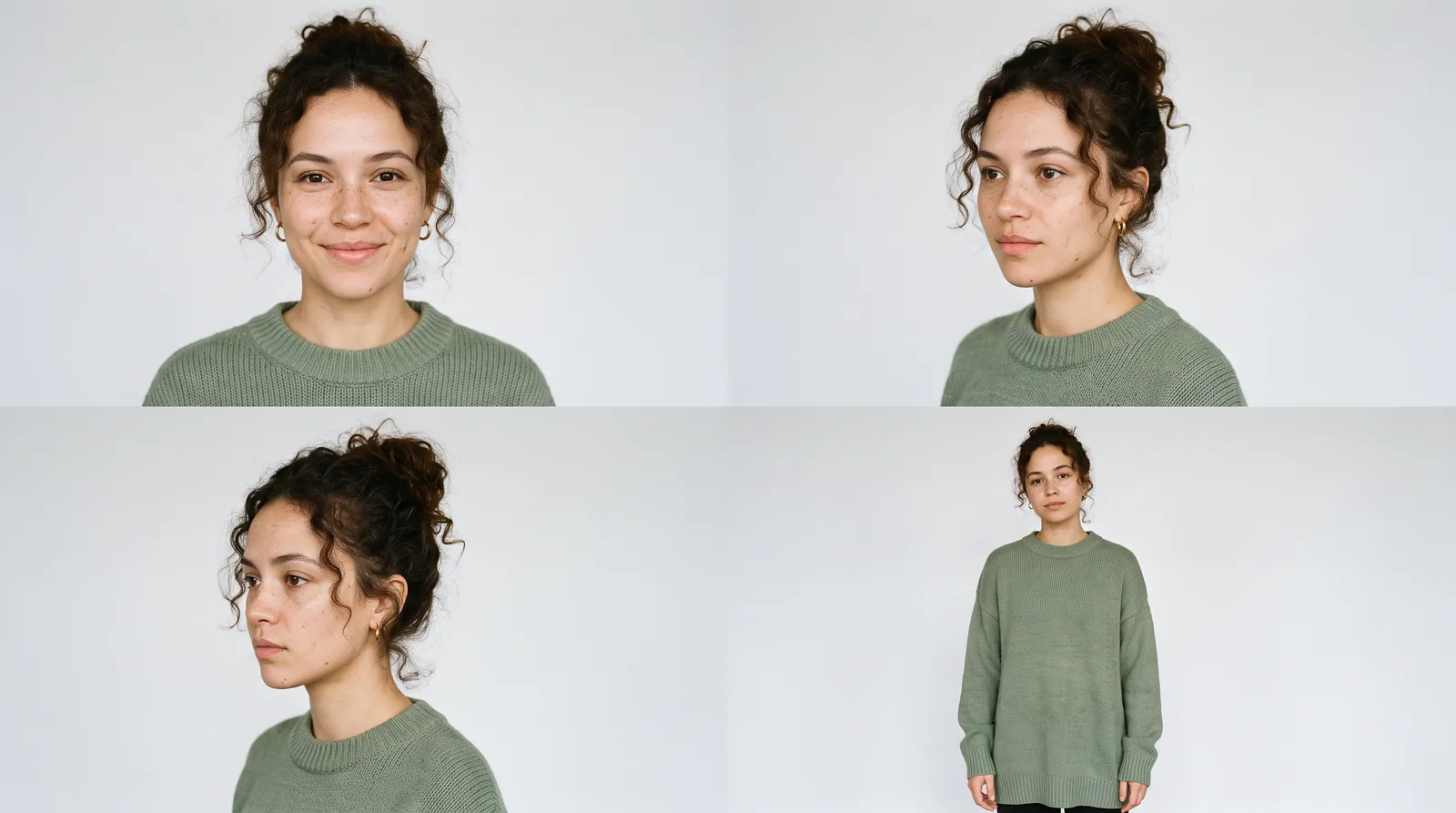
A few details in that prompt are doing more work than they seem to. “Natural skin marks”, “no heavy make-up” and “unretouched” pull the image away from the airbrushed look that gives AI creators away. The clothes are specific and simple, because a plain jumper is far easier to keep consistent than a patterned shirt. And the plain background means nothing from the sheet leaks into the scenes you build later.
Once you have a sheet you like, save it and treat it as the creator’s passport. Every start frame from now on attaches it, and the prompt says what the sheet is for. Here’s the hook frame for the worked example, which also attaches a clean photo of the product so the label stays right.
Prompt
Using the attached character sheet for the woman and the attached product photo for the bottle, show her standing at the counter of a small, slightly cluttered kitchen in the morning, holding the amber NORTHBOUND bottle up close to the camera with the label facing it and a half-amused expression. It looks like a still from a selfie video filmed on a phone at arm's length, with soft window light, a kettle and a fruit bowl behind her, and natural skin texture. Keep her face, hair and jumper exactly as they are in the character sheet, and keep the label exactly as it is in the product photo.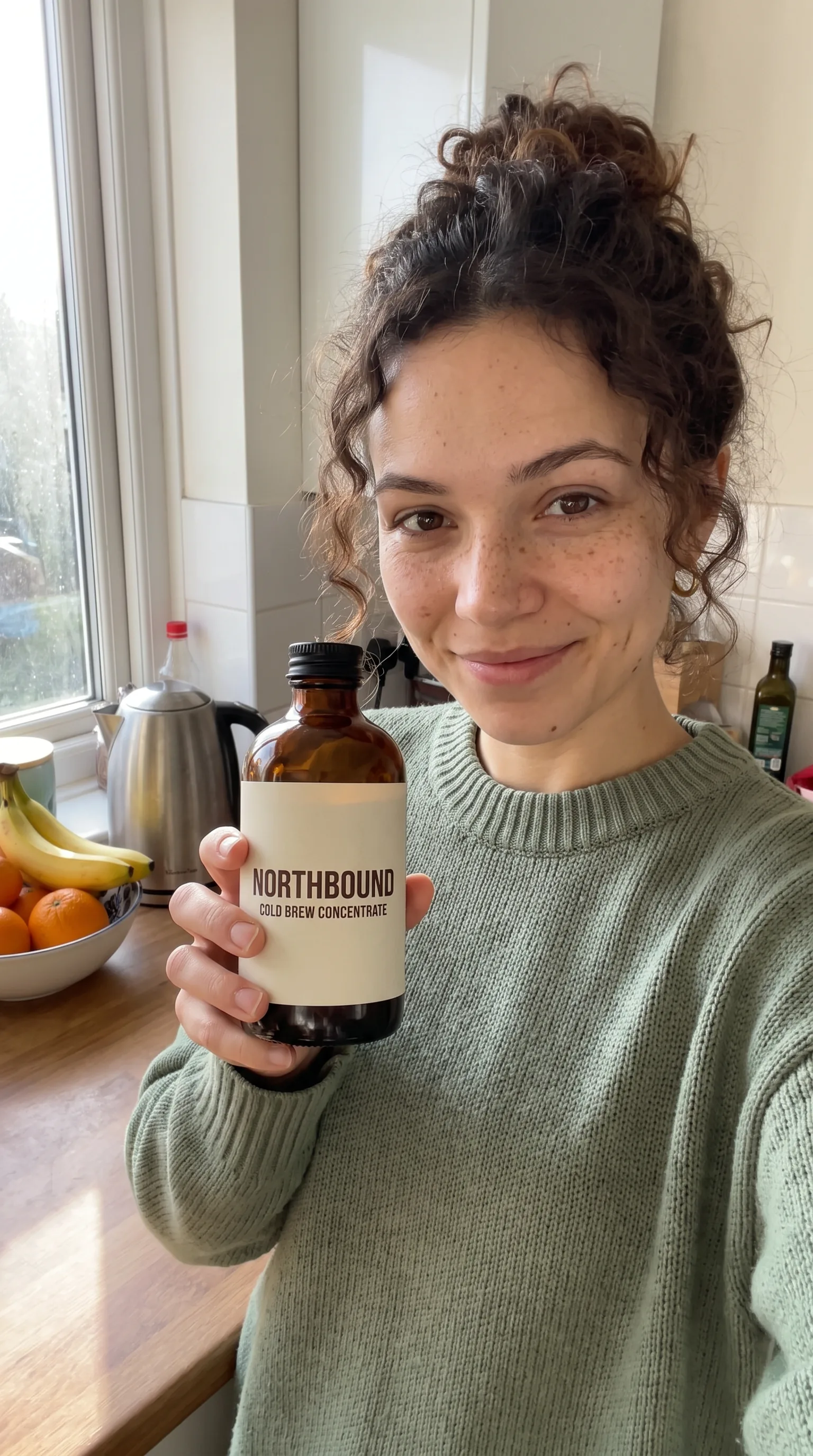
In PromptWise you can add up to 10 reference images to a generation, either as uploads or from your library, which is plenty for a character sheet, a product photo and a room or two. If you don’t yet have a clean product photo, the guide to AI product photography covers making one.
If one creator is going to front a whole run of ads, the character sheet is what keeps her consistent: reuse the same reference images for every ad, and when she needs to say a line you’ve already recorded, Seedance 2.5 can lip-sync her from the uploaded image and audio (more on that in the voice section below). And if you’d rather start from a ready-made flow than build every shot by hand, that’s the job of UGC Factory, which PromptWise describes as creating ready-to-use UGC ads with realistic AI creators in a few clicks. This guide builds the ad shot by shot so you can see and control each step, and the same thinking about briefs, hooks and honesty applies whichever route you take.
From start frame to moving shot
Once the stills are right, each one becomes the first frame of a video clip. Starting from an image rather than from text alone is the single best habit in AI UGC, because you approve the creator, the room, the light and the label as a still before you spend credits on motion. The video model’s job is then only to make that frame move. The guide to how to make AI videos explains the image-first approach in more detail. In PromptWise’s video settings, the start frame goes into the Start / End Frame control, next to the model, aspect ratio and length.
The video prompt should describe what happens, how the camera behaves and what you hear, and it shouldn’t describe the creator’s appearance again, because the frame already shows it. Keep each clip to one action. A shot where she holds up the bottle, then pours, then sips, then laughs is four shots crammed into one, and the model will usually fudge at least one of them.
Here’s the talking hook from the worked example, written for Seedance 2.5.
Prompt
The woman holds the bottle up to the camera, raises her eyebrows slightly and says, in a relaxed, friendly voice: "If your iced coffee habit costs more than your phone bill, watch this." The camera is handheld at arm's length with a small, natural wobble, like a selfie video. Quiet kitchen sounds in the background. She keeps the label facing the camera the whole time.And here’s the demo, which starts from its own close-up frame.
Prompt
Using the attached product photo for the bottle, a close-up from above of a glass full of ice cubes on a wooden kitchen counter, with a woman's hand in a sage green sleeve pouring dark coffee concentrate from the amber NORTHBOUND bottle into it. Morning light comes from the side, there's a carton of oat milk and a teaspoon nearby, and the label is clearly readable. It should look like a frame from a phone video rather than a studio shot.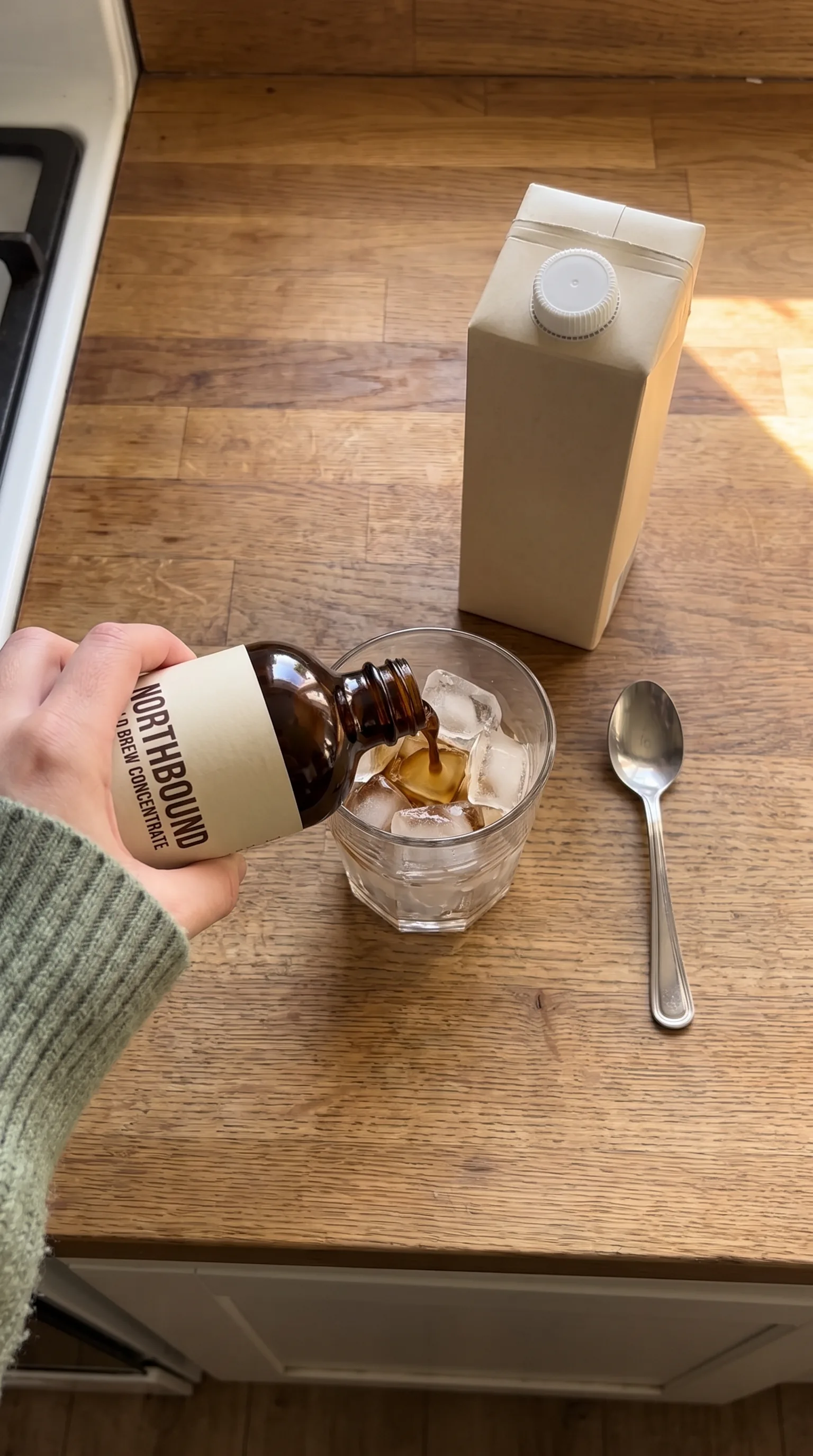
Prompt
She pours the concentrate slowly over the ice until the glass is about a third full, then puts the bottle down and tops the glass up with oat milk, which swirls through the coffee. The camera stays still, looking down from above, as if the phone were propped on a shelf. You hear ice cracking and liquid pouring, nothing else. The label stays sharp and readable throughout.Two small things in those prompts are worth copying. The camera is described the way a creator would actually film it, handheld at arm’s length or propped on a shelf, which keeps the UGC feel. And the sound is written in, because the video models in PromptWise that make audio take their cue from the prompt, so a pour you can hear is far more satisfying than a silent one.
Which model for which shot
PromptWise has 20 video models, and for UGC the choice mostly comes down to three families plus Motion Control. Here’s a clear view of where each one earns its place, based on what the model makers say their models are built for and the clip lengths shown in the app. The Seedance vs Kling vs Veo comparison goes into each one in much more depth, with a set of test prompts you can run yourself.
| Shot in a UGC ad | First choice | Why | Draft it on |
|---|---|---|---|
| Creator talking to camera (the hook) | Seedance 2.5 | Picture and sound in one pass, and ByteDance says it keeps characters’ looks and voices stable | Seedance 2.0 Fast |
| A spoken line that has to land exactly | Veo 3.1 Quality | Google built Veo 3.1 around sound and picture in sync; clips of 4, 6 or 8 seconds | Veo 3.1 Fast or Veo 3.1 Lite |
| Product demo where the label must stay sharp | Kling 3.0 | Kuaishou says it keeps text and logos crisp through the clip; 3 to 15 seconds, up to 4K | Kling 3.0 Turbo |
| One longer take with sound, 15 to 30 seconds | Seedance 2.5 | Up to 30 seconds in one generation, with sound | Seedance 2.0 Fast |
| A gesture or movement you can perform yourself | Kling 3.0 Motion Control | Copies the movement from a reference video onto your character | Not needed |
| Creator stills, start frames and end cards | Nano Banana Pro | Reference images, consistent people and readable text | Nano Banana 2 |
| Voiceover over demo shots | ElevenLabs Multilingual V2 or Seed Audio 1.0 Speech | Text-to-speech and narration from a script | ElevenLabs Flash |
| Music and sound effects | CassetteAI Music, Seed Audio 1.0 Music, ElevenLabs Sound Effects | Music and effects from a text description | Not needed |
If you only learn one video model for UGC, make it Seedance 2.5. A creator talking to camera needs a believable face and a voice that matches it, and Seedance 2.5 makes the picture and the sound together, for up to 30 seconds in a single generation. ByteDance also says it worked specifically on the things that make AI video look artificial, such as skin and eye detail, lighting and colour, and that it can keep the appearance and voice of several characters stable. That’s exactly the list of things a UGC ad can’t get wrong. It’s also the one to use when the ad works better as one continuous take, like a creator walking through a room while talking.
Bring in Kling 3.0 for the product shots. Kuaishou built it to keep signs and logos readable, so it’s the first choice whenever the label has to stay sharp while the bottle tilts or the box turns. Its clips run from 3 to 15 seconds, at up to 4K, which suits UGC well, because demo shots are short anyway.
Veo 3.1 is the specialist for dialogue. If the whole ad hangs on one line said with the right timing, it’s worth trying, though Google itself notes that very short spoken lines are still something it’s working on, so give the creator a full sentence rather than a single word. And Kling 3.0 Motion Control is the one to use when a specific movement matters, such as a particular way of unboxing something or a dance to a trend. You film the movement yourself, give Motion Control that clip and a still of your creator, and it carries the motion across. Kuaishou’s guidance is to keep one person fully in view, use one continuous shot and match the framing of the still.
Voiceover and lip-sync
There are three ways to give an AI creator a voice, and knowing which one a shot needs saves a lot of frustration. The first is to let the video model make the speech along with the picture. Kling 3.0, Veo 3.1 and Seedance 2.5 all generate sound, so when you write a spoken line into the prompt, the creator’s mouth and voice are made together in the same generation. For any shot where the creator is on camera talking, this is the route to use, because the lips and the words come from the same place.
The second way is a separate voiceover, made in one of the audio models and laid over shots where nobody is speaking on camera. That’s ideal for demo shots, close-ups of hands and product, and end cards. In PromptWise, the audio models include ElevenLabs Multilingual V2, which the app describes as ultra-realistic multilingual text-to-speech, ElevenLabs Flash for quick generations, and Seed Audio 1.0 Speech for narration and dialogue from a script. You pick a voice from the list in the audio settings, paste in the lines and generate.
Plenty of UGC ads use both. In the NORTHBOUND example, Maya speaks on camera in the hook and the reaction, but the pour in the middle has nobody’s mouth in shot, so her line runs over it as a voiceover. The risk is that the viewer notices two slightly different voices. To get round it, make the on-camera clips first, listen to them properly, and then go through the voice list for the closest match. If nothing is quite right, keep the voiceover short, because a small difference over four seconds is much easier to miss than over ten.
The third way is lip-sync: putting audio you’ve already made onto the creator’s face, so her lips follow it. In PromptWise that happens in Seedance 2.5. Upload the creator’s image (the character sheet or an approved start frame) as the image reference and the audio as the audio reference, either your own recording or an Elevenlabs voice, then describe the scene, and Seedance 2.5 generates the clip with her mouth moving to that audio. It’s the cleanest answer to the two-voices problem above, because every on-camera line and every voiceover can use the same voice file, and it’s how a creator keeps exactly the same voice across a whole run of ads. Note that PromptWise’s Acceptable Use Policy lists lip-sync among the features that aren’t available to residents of Illinois or Texas. And whichever route you take, only ever use a voice you have the right to use. PromptWise’s Acceptable Use Policy rules out content that impersonates the voice or likeness of a real person without consent, so cloning a celebrity or a real customer’s voice is off the table.
If you’re making ads for more than one market, languages are worth planning for from the start. Kuaishou says Kling 3.0 generates speech in English, Chinese, Japanese, Korean and Spanish, with a range of accents and dialects, and ElevenLabs Multilingual V2 is built for speech in more than one language, so check the language list for whichever model you choose. The simplest way to make a second-language version is to keep the same start frames and swap only the spoken line, so the creator, the room and the product stay identical. Have a fluent speaker check every line before it runs, because a script that’s slightly off in translation sounds far less natural than the original.
Captions, the edit and formats
When the clips and the audio are done, everything gets downloaded and put together in whatever editor you already use, whether that’s an app on your phone or something heavier on a laptop. That’s where the captions go on, the music sits underneath and the last few frames get trimmed. Don’t be surprised if the edit is quicker than you expect. Each clip was planned as one clear action, so a 25-second ad might only have three or four cuts in it.
Captions are the bit people underrate. A lot of feed viewing happens with the sound off, on a bus or in bed next to someone asleep, and for those viewers the captions are the ad. Add them in the editor rather than asking a video model to draw them, partly because added text stays crisp and partly because you’ll want to change the words for the next version without regenerating anything. Short chunks of three or four words read better than full sentences, and a chunky typeface with an outline or a solid box behind it will survive a busy kitchen background. Change the caption in time with the speech. And keep it, along with Maya’s face, roughly in the middle of the frame, since the app’s own buttons, the username and the description all crowd the bottom and the right-hand edge.
The end card is different. It doesn’t move, so it’s the one place where lettering inside a generated image makes sense, and Nano Banana Pro is good at lettering. Here’s the prompt used for the NORTHBOUND end card:
Prompt
A vertical end card for a social ad. A glass of iced coffee with milk swirling through it and the amber NORTHBOUND bottle beside it sit on a wooden counter in the lower half of the frame. Across the top, in large, clean, bold white lettering on a soft warm brown background, are the words "Iced coffee at home in 10 seconds", and underneath in smaller letters, "Get yours at the link". Leave the bottom fifth of the frame plain.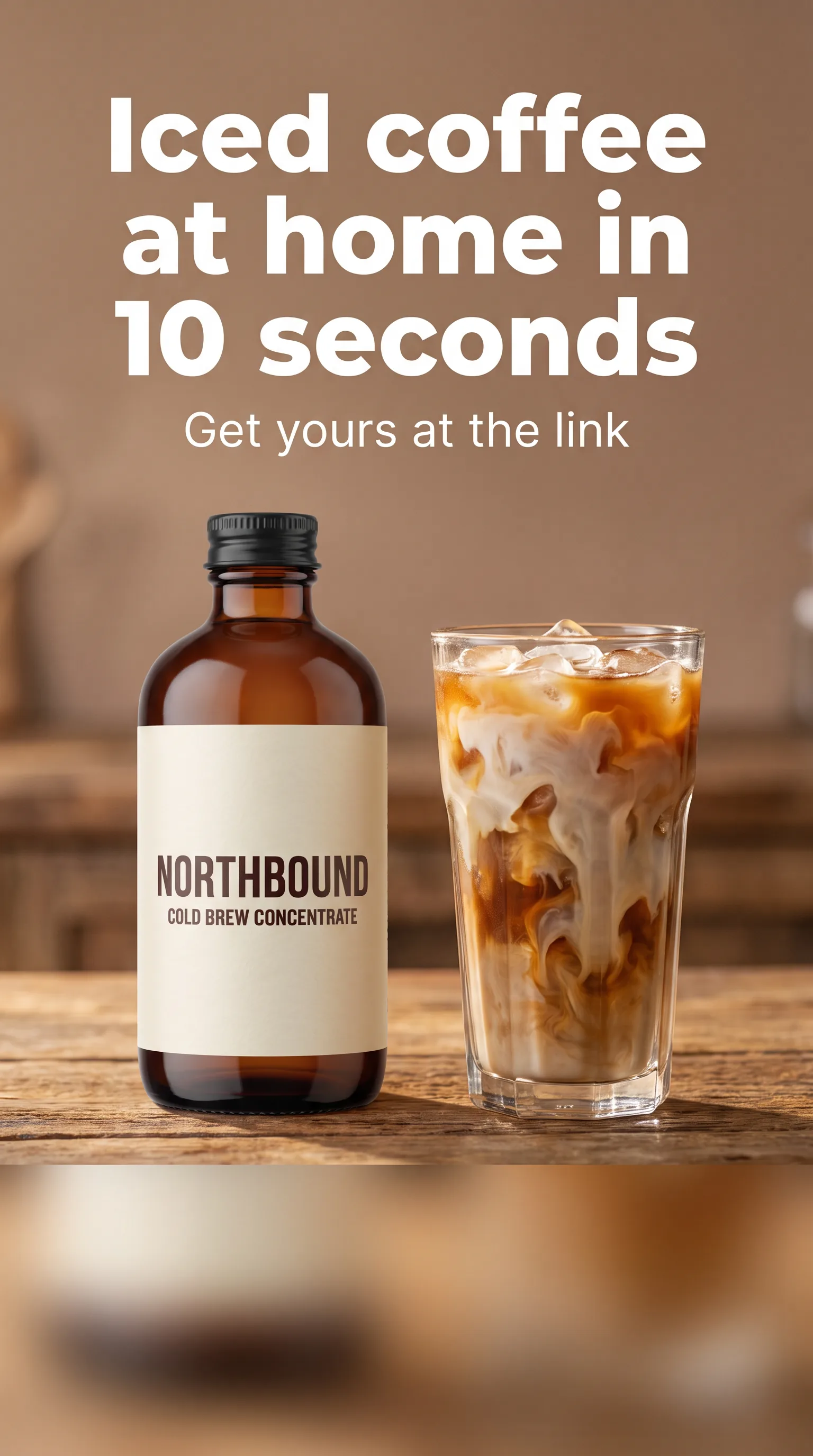
On format, 9:16 is the version to make first. It fills the whole phone screen on Reels, TikTok and Shorts, and those are the places where an ad that looks like someone filmed it in their kitchen feels at home. If you’re also running in feeds that prefer 4:5 or 1:1, make those from their own start frames rather than cropping the vertical edit. A crop that looks fine on the creator’s face can easily chop off the bottle or her hands, and then the demo doesn’t show anything. Pick the aspect ratio in the image settings before making each start frame, and keep the same one for the clip that comes from it.
Testing variations without starting over
The real advantage of AI UGC isn’t one great ad. It’s the ability to make ten slightly different versions of a good ad quickly, for a handful of credits, then let the results tell you which one to back. That only works if the versions are planned, though, because changing five things at once tells you nothing about which change mattered.
Start with the hook, since it has the biggest effect and it’s the easiest thing to swap. Keep the demo, the proof and the end card exactly the same, and make three to five versions that differ only in the first shot and its line. Once a hook is clearly ahead, move on to the next variable: the creator, then the call to action or the end card, then the length. Two creators who look and sound different can be tested against each other in the same way, by running the identical script through both of them.
A little bookkeeping goes a long way here. Name every file with its version, such as “NB-hook03-maya-25s”, so that when a result comes back you know exactly what it was. Draft each new clip on a faster model, like Kling 3.0 Turbo or Seedance 2.0 Fast, and only run the final model once the draft does what you want, without changing the prompt in between. And make the most of parallel generations. Every PromptWise plan can run several image and video generations at once (two on Starter, up to eight on Max), so the five hook variations can all be generating while you write the next brief.
If you find yourself running the same chain of steps for every product, Flows is worth a look. PromptWise describes it as a node-based creative canvas that connects prompts, images, videos and models into workflows you can reuse, refine and scale, which is a good description of a UGC pipeline: brief, creator, start frames, clips, end card.
Worked example: a 25-second ad from brief to finished cut
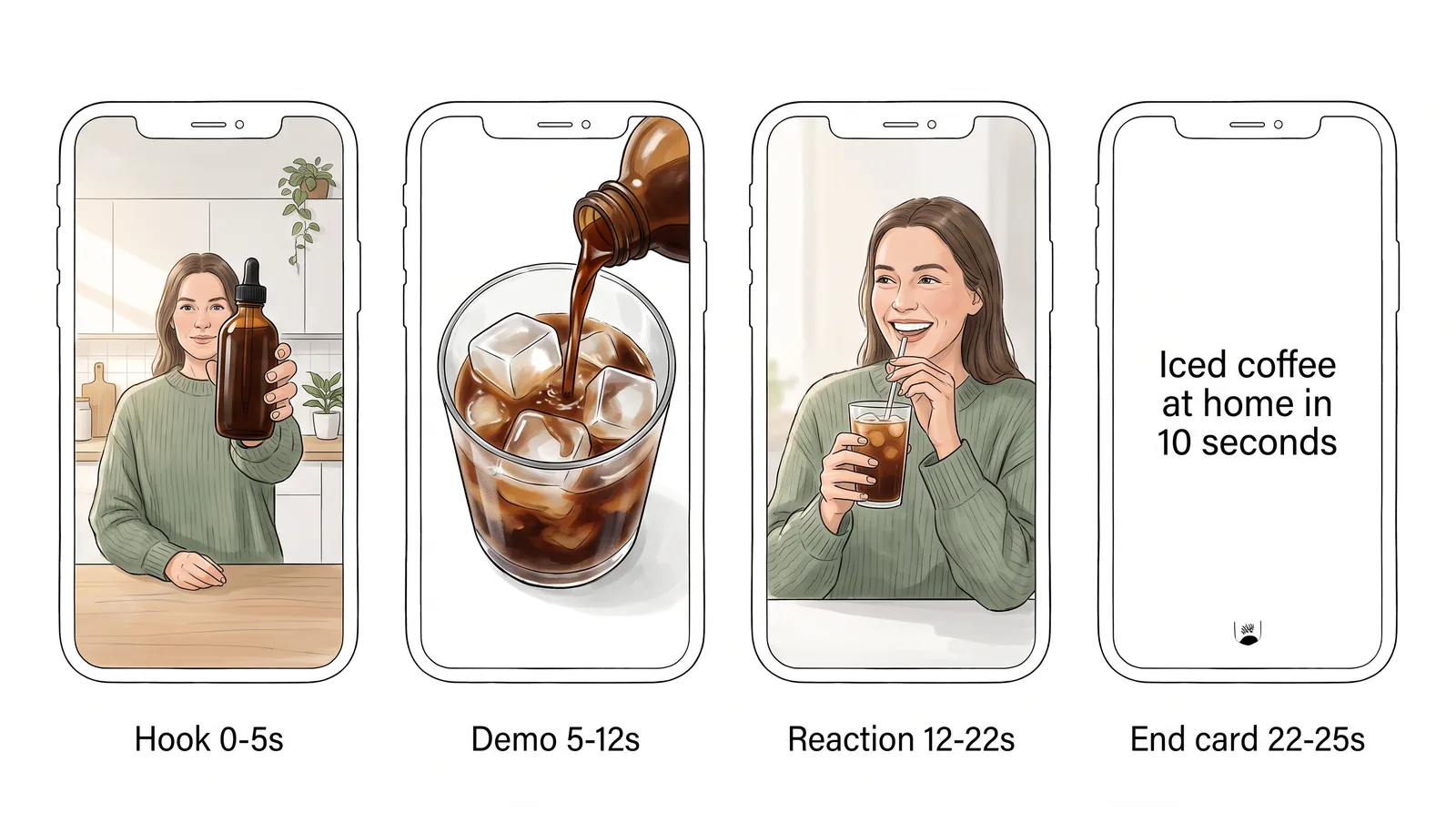
Here’s how the NORTHBOUND cold brew ad comes together, start to finish, using the brief from earlier and Script A. It’s four shots and about 25 seconds at 9:16, with Maya as the creator all the way through.
The brief is already written, so the work starts with the script. Read aloud, Script A comes in at about 50 spoken words, which leaves a comfortable gap for the pour in the middle, and it opens on “If your iced coffee habit costs more than your phone bill, watch this.” Before going any further, four other hooks get jotted down for testing later, among them “Here’s the ten-second version of a café iced latte” and “Quick one, because you’re busy.”
Next comes Maya herself. The character sheet prompt goes into Nano Banana Pro at 16:9, and it normally takes a couple of goes to land on a face that feels right, someone who looks as if she really would queue for an iced coffee every morning rather than someone who’d be in the advert for the café. The best version gets saved as the creator reference, next to a clean photo of the bottle.
With the references ready, the start frames follow, all at 9:16 in Nano Banana Pro with both references attached. There are three of them: Maya holding the bottle up to the lens for the hook, the overhead pour for the demo, and a medium shot of her at the counter with the finished glass for the reaction. The end card gets made in the same way. This is the moment to be fussy, because a wonky label or an extra finger is a two-credit fix as a still and a much more expensive one once it’s moving.
Then the clips. The hook goes to Seedance 2.5 with the talking prompt at about 5 seconds, after a quick draft on Seedance 2.0 Fast to check the movement. The pour goes to Kling 3.0 at about 7 seconds, drafted on Kling 3.0 Turbo first, because the label has to stay readable while the bottle tilts. And the reaction, where Maya stirs, sips and delivers her line, goes back to Seedance 2.5 at about 10 seconds, since it’s one continuous moment with speech and kitchen noise that would only lose something if it were cut up.
Prompt
The woman stirs the iced coffee with a teaspoon, takes a sip, nods and says to the camera, "That's it. Ten seconds, no queue, café-style iced coffee at home." Then she lifts the glass slightly towards the lens and smiles. Handheld phone camera at arm's length in a small morning kitchen, natural window light, gentle kitchen sounds.Sound is mostly taken care of by now, because the hook and the reaction lines come out of the video models with Maya’s voice already in them. The demo shot has no one talking on camera, so its line, “One measure of NORTHBOUND over ice. Top it up with whatever milk you like”, goes on as a voiceover from ElevenLabs Multilingual V2, using whichever voice sounds closest to Maya’s. A soft, upbeat bit of music from CassetteAI Music sits quietly underneath.
Everything then goes into the editor in order: hook, demo, reaction, and the end card held for about three seconds with “Get yours at the link” on it. Captions go on in short chunks, kept near the middle of the frame and away from the bottom, and the whole ad comes out at 25 seconds.
The variations are the easy part. Using the same hook frame, four new hook clips get generated, one for each of the alternative lines, and each one is dropped into a copy of the finished edit. Nothing after the first shot changes, so when the results come in, the only thing being compared is the opening.
Keep it honest: AI creators and disclosure
AI creators are a great way to make ads quickly, but they come with one firm rule: an AI creator must never pose as a real customer. A fictional person can’t have used your product, so a script where they say they’ve been using it for months, or that it changed their skin, their sleep or their bank balance, is a fake testimonial however natural it sounds. Advertising and consumer protection rules generally treat made-up endorsements as misleading, and audiences tend to feel the same way when they find out.
The good news is that honest UGC-style ads work fine. Write the creator as a presenter showing the product, as in the scripts above, and let the demo do the persuading. If you want real testimonials, use real customers with their permission, and keep their words exactly as they said them.
Disclosure is the other half. Each ad platform has its own rules about labelling AI-generated or digitally altered content in ads, and those rules change, so check the current policy of every platform you run on before the campaign goes live, and follow it. PromptWise’s own Trust & Safety page is clear that where you publish or share AI-generated content, you’re responsible for any disclosure the law requires. Its Acceptable Use Policy also rules out content that impersonates a real person’s face, voice or likeness without consent, or that falsely links a real person to a product they haven’t endorsed, so an AI creator should never be built to resemble a real influencer, celebrity or customer.
None of this gets in the way of a good ad. It just means the creator is a presenter, the claims are things the demo shows, and the ad is labelled however the platform asks.
What it costs in credits
Every PromptWise plan includes every model, and each generation uses credits from your monthly allowance. How much a generation uses depends on the model, the length and the resolution: current credit costs are on PromptWise’s pricing page, and the Generate button shows the exact cost before you press it.
For the worked example, the stills are the easy part to estimate. A character sheet, three start frames and an end card, with a few retries each, comes to roughly a dozen Nano Banana Pro images, a small share of a Starter month. The video clips are where most of the credits go, and how many depends on how often you redraft. Drafting on Kling 3.0 Turbo or Seedance 2.0 Fast and only running the final model once a draft works is the simplest way to keep that number down.
Plans run from Starter ($19 a month, 275 credits) through Plus ($39, 800), Pro ($79, 1,800) and Max ($149, 3,800), with Max 2 ($249, 6,500) and Max 3 ($349, 9,500) for teams producing at volume. Credits refresh each billing month and unused ones don’t roll over, and if a generation fails its credits are refunded automatically. If you’re comparing PromptWise with dedicated UGC tools, the Arcads alternative and Creatify alternative pages set the plans side by side.
Frequently asked questions
What is an AI UGC ad?
It’s an ad made to look and feel like user-generated content, with a person talking to a phone camera in an everyday setting, but with the creator, the shots and often the voice made by AI models instead of filmed. The structure is the same as real UGC: a hook, a short demo of the product and a call to action.
How do I make UGC ads with AI?
Write a one-page brief, build one consistent AI creator from reference images, script a hook for the first two seconds, then turn approved stills into talking and demo shots with a video model and cut them with captions. In PromptWise, UGC Factory also creates ready-to-use UGC ads with realistic AI creators in a few clicks. The AI creator presents the product and never gives a testimonial.
What makes a good hook for a UGC ad?
A good hook gives the right viewer a reason to keep watching within the first two seconds. Call out who the ad is for, name a problem they recognise, or promise something quick and specific, and make sure the opening frame is already moving. Avoid starting with a greeting or the brand name.
How long should a UGC ad script be?
For a 20 to 30-second ad, aim for roughly 50 to 75 spoken words, since relaxed speech runs at about two to three words a second. Leave space for a demo moment with no talking, and read the script aloud to check it fits.
How do I lip-sync an AI creator for a UGC ad?
In PromptWise, use Seedance 2.5: upload the creator’s image as the image reference and the audio, your own recording or an Elevenlabs voice, as the audio reference, then describe the scene. The creator’s mouth follows that audio, so every line and voiceover can share one voice file. Lip-sync isn’t available to residents of Illinois or Texas, and only use a voice you have the right to use.
Should I test one AI creator or several?
Start with one creator and test hooks first, because the hook usually makes the biggest difference. Once a hook is clearly ahead, run that same script through a second creator who looks and sounds different, and change nothing else, so you know the creator is what made the difference.
Do I need to say an ad uses an AI creator?
Check the current ad policy of each platform you run on, as well as the law where the ad is shown, and follow whatever disclosure they require. PromptWise’s Trust & Safety page notes that you’re responsible for any disclosure the law requires when you publish AI-generated content.
More answers: AI UGC in other languages
Your first AI UGC ad
The quickest way to learn this is to make one ad from start to finish, even a rough one. Write the one-page brief, pick a hook from the list, build your creator in Nano Banana Pro, and turn three start frames into clips with Seedance 2.5 and Kling 3.0. Then put it together with captions and an end card and see how it looks on your phone. Once the first one exists, every version after that is mostly a matter of swapping a hook or a line, which is exactly where AI saves the most time.
Sources
We checked these official pages on the dates shown. Prices and specs can change, so check the provider's page before you buy.
- ByteDance Seed: Seedance 2.5 launch announcement (Checked 24 Oct 2026)
- Kuaishou: Kling 3.0 launch announcement (Checked 24 Oct 2026)
- Kling AI: Kling 3.0 user guide (Checked 24 Oct 2026)
- Kling AI: Motion Control user guide (Checked 24 Oct 2026)
- Google DeepMind: Veo (Checked 24 Oct 2026)
- Google Cloud: Veo 3.1 prompting guide (Checked 24 Oct 2026)
- Google: Nano Banana Pro launch announcement (Checked 24 Oct 2026)